

In the fast-paced world of B2B sales and recruitment, time is your most valuable asset. Yet, sales reps spend more than 21% of their week just writing and personalizing messages, according to a HubSpot survey. Imagine reclaiming that time with automation and mass messaging in one minute?!
Welcome to the future of outreach, where LinkedIn automation tools in 2026 are transforming how professionals connect, message, and generate leads. Whether you’re a sales leader, recruiter, or founder, using the best LinkedIn automation tool like LinkedFusion can help you send mass messages and automate your LinkedIn outreach. Such tools help save 4-5 hours daily and boost conversions safely.
Why LinkedIn Message Automation is a Must in 2026?
LinkedIn continues to be the most powerful platform for B2B networking and lead generation. But its manual messaging process is time-consuming and inefficient when you’re scaling outreach. This is where LinkedIn automation tools like LinkedFusion come in.
Using automation tools in 2026, you can:
- Send personalized messages at scale.
- Set up follow-up sequences.
- Ensure compliance with LinkedIn’s daily limits.
- Integrate with CRMs to streamline the lead generation process.
Done right, LinkedIn message automation increases engagement, improves prospecting outcomes, and ensures consistency across your outreach campaigns.
Reddit users suggest balancing mass LinkedIn messaging with targeted outreach by using broad messages for awareness and personal ones to drive real engagement.
Can You Automate Sending LinkedIn Messages without violating LinkedIn limits?
Yes, you absolutely can, but only with the right tools. Native LinkedIn doesn’t allow message automation, but cloud-based LinkedIn automation tools like LinkedFusion make it possible to automate:
- Connection requests with personalized notes.
- Follow-up messages after a connection is accepted.
- Drip campaigns based on user activity.
LinkedFusion stands out because it offers AI-powered LinkedIn automation that’s safe to use and mimics human behavior. It uses smart delays, variable messaging, and randomized actions to ensure your LinkedIn account stays protected while automating outreach.
How to Use LinkedIn Automation Tools for Effective Messaging
1. Build a Targeted Prospect List
Start with LinkedIn Sales Navigator or LinkedIn Search to build a laser-focused prospect list. Use filters like job title, location, industry, and company size. Export your list into your LinkedIn automation tool.
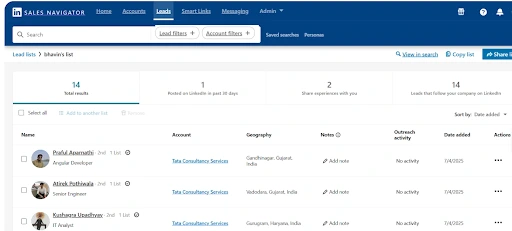
Pro Tip: Refine your searches regularly. Avoid bulk messaging irrelevant profiles.
2. Create Personalized Message Templates
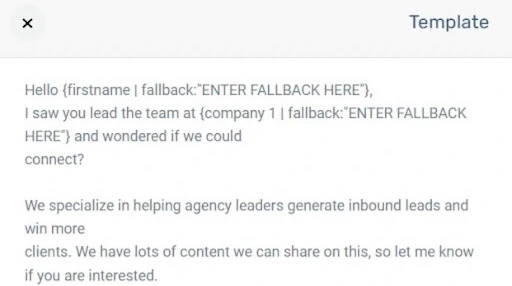
Avoid sounding like a bot. Automation tools allow you to insert dynamic tags (first name, company, role) into your message templates.
Example:
Reddit users say mass messaging on LinkedIn feels spammy and rarely gets genuine responses unless it’s hyper-personalized.
3. Design a Smart Message Sequence
Set up a message drip campaign:
- Day 0: Send a connection request with a custom note.
- Day 2: If accepted, send a short welcome message.
- Day 5: Follow-up with value (a blog, case study, or offer).
- Day 10: One final message or question to prompt engagement.
Automation tools make sequencing easy with their LinkedIn message automation dashboard.
LinkedIn Message Automation Tools to Scale Outreach Campaigns
LinkedFusion – The Best LinkedIn Automation Tool for 2026
LinkedFusion is a cloud-based LinkedIn automation tool designed for safe, scalable outreach. Unlike browser plugins that risk getting your LinkedIn account banned, LinkedFusion operates from the cloud with dedicated IPs.
Key Features:
- Smart message sequences & follow-up campaigns
- Personalization tags and message templates
- CRM integrations with HubSpot, Salesforce, and Pipedrive
- Multichannel support (LinkedIn + Email)
- In-depth analytics and message tracking
Safe to use: LinkedFusion respects LinkedIn’s daily limits, that is, 40 connection requests and 120 messages per day.
Benefit: Send automated personalized invitations and build a pipeline without burning out your team.
Can I Bulk Message on LinkedIn?
Not natively. LinkedIn does not support bulk messaging unless you’re messaging group members or connections one by one.
But with LinkedIn automation tools like LinkedFusion, bulk messaging is possible. You can:
- Segment prospects based on industry, seniority, or geography.
- Send bulk messages with custom variables.
- Schedule follow-ups automatically.
Important: Avoid sending the same message to more than 50–70 people in a day. Always rotate templates.
Best Practices for Automating LinkedIn Outreach in 2026
1. Avoid Getting Banned by LinkedIn
Stay within daily limits: 40 invites and 120 messages. Don’t run multiple tools simultaneously on one LinkedIn account.
2. Always Personalize Outreach Messages
LinkedIn is a relationship-first platform. Even while automating, your messages must feel human.
3. Schedule Your Campaigns
Run your campaigns during business hours in your recipient’s time zone. LinkedFusion allows you to choose activity windows.
4. Monitor and Optimize
Track metrics like:
- Connection acceptance rate
- Reply rate
- Campaign performance
LinkedFusion’s dashboard makes it easy to tweak outreach efforts for better results.
Reddit users say sending mass InMails with templates in Sales Navigator isn’t natively supported, so most use third-party tools or automation to streamline the process.
Automate LinkedIn Outreach with CRM Integration
Pairing your automation tool with a LinkedIn CRM ensures that your lead generation process doesn’t break. LinkedFusion supports direct integration with:
- HubSpot – Sync leads and conversations
- Pipedrive – Track deals and status
- Salesforce – Enterprise-grade workflows
This makes it easier to manage LinkedIn leads from outreach to deal closing without switching tabs.
What Is the Best Automation Tool for LinkedIn Mass Messaging?
While several tools exist, here’s a quick comparison:
| Tool | Type | Safety | Notable Feature | Best For |
|---|---|---|---|---|
|
LinkedFusion |
Cloud |
High |
AI-powered smart sequences |
SMBs, Sales Teams |
|
Expandi |
Cloud |
High |
Multichannel (LinkedIn + Email) |
Growth Agencies |
|
Zopto |
Cloud |
Medium |
Sales Navigator Integration |
Recruiters |
|
Meet Alfred |
Desktop |
Low |
Multichannel Messaging |
Freelancers |
|
Dux-Soup |
Chrome Plugin |
Low |
Easy Setup |
Beginners |
Verdict: LinkedFusion is the best LinkedIn automation tool for lead generation in 2026, combining power, compliance, and ease of use.
Tips for Sending LinkedIn Messages Without Getting Flagged
- Don’t send spammy links in the first message.
- Keep messages short and value-driven.
- Never pitch in your connection request.
- Personalize your follow-ups (use content like case studies, whitepapers).
- Rotate your templates every 2–3 days.
- Use time delays between actions.
LinkedIn may flag repetitive messages or unusual activity. That’s why you need tools like LinkedFusion that simulate human behavior.
Future of LinkedIn Automation Tools in 2026 and Beyond
AI-powered LinkedIn automation is evolving rapidly. By the end of 2026, we expect:
- Smarter intent detection via LinkedIn activity tracking
- Integration with voice and video messages
- Predictive prospect scoring
- Enhanced privacy and compliance
LinkedFusion is already moving in this direction with features like campaign analytics, CRM sync, and multichannel outreach.
Final Thoughts: Streamline Lead Generation with LinkedIn Message Automation
LinkedIn message automation is no longer optional; it’s essential for scaling lead generation and outreach without burning out your team.
With the right tools like LinkedFusion, you can:
- Send personalized LinkedIn messages at scale
- Automate follow-ups and drip campaigns
- Protect your account and comply with LinkedIn limits
- Track performance and optimize campaigns
If you’re serious about B2B sales, recruitment, or networking in 2026, it’s time to use LinkedIn automation tools to your advantage.
Try LinkedFusion today with a free trial and see how you can automate your LinkedIn outreach while keeping it human.