

In a world flooded with generic cold emails and outreach messages, standing out is harder than ever. Studies show that 72% of consumers say they only reply to marketing messages that are personalized and altered to their interests (Source: SmarterHQ). That’s a clear sign—if your outreach strategy still relies on cookie-cutter sales emails, it’s time for a change.
This blog will guide you through building an effective personalized outreach strategy that improves response rates, generates more leads, and builds better prospect relationships. Whether you’re working on LinkedIn outreach or B2B email campaigns, this guide breaks down personalization techniques that can transform your results.
Why Personalized Outreach Is Essential for Modern Sales Engagement?
Personalized outreach isn’t just a buzzword; it’s become a critical part of sales engagement and lead generation. Generic messages get ignored; personalized messages resonate.
When you personalize your outreach, you:
- Improve open rates and reply rates
- Build stronger relationships with your prospects
- Tailor your communication channels based on real prospect data
LinkedFusion is one LinkedIn automation tool that helps create personalized outreach by crafting dynamic message templates and email sequences that don’t feel robotic. Whether it’s a cold email or LinkedIn message, the right level of personalization can make or break your campaign.
The Core Elements of a Personalized Outreach Strategy
Building a solid outreach strategy requires focusing on personalization across every touchpoint, from subject lines to follow-up emails. Here are the pillars of a successful personalized outreach campaign:
- Personalize Your Cold Emails: Use prospect data such as name, company name, or pain points in your email body.
- Personalized Subject Line: Crafting a subject line that grabs attention and resonates with the prospect’s needs.
- Tailoring Your Communication: Using templates while adding unique, prospect-specific information.
- Measuring Key Metrics: Tracking LinkedIn metrics like open rates, reply rates, and conversion rates to understand what messaging resonates most with your audience.
How to Personalize Your Cold Emails for Maximum Impact?
Personalizing your cold emails involves more than just using a prospect’s name. To truly stand out from the crowd:
1. Personalize Your Subject Line
Your subject line is the first thing prospects see. A personalized subject line mentioning a prospect’s company name or a specific pain point can dramatically increase open rates.
For example:
- “Quick idea for [Company Name]’s sales process”
- “Solving [Prospect’s Pain Point] with a fresh approach”
Both options show a personal touch that connects with the recipient’s challenges.
2. Craft a Personalized Email Body
Once they open your email, the next hurdle is getting them to read it. Here’s where good personalization makes the difference:
- Mention something specific about the prospect’s role or business.
- Refer to recent company news or industry trends that impact them.
- Share a case study relevant to their specific problem.
This creates a personalized experience rather than a generic sales pitch.
3. Tailor Your Messages Based on Prospect Segments
Not every prospect is the same. B2B sales outreach requires tailoring your communication for different segments:
- Decision-makers vs. influencers
- Small businesses vs. enterprise companies
- Technical roles vs. non-technical roles
Writing Personalized Messages That Resonate with Your Audience
The way you craft personalized messages determines how likely prospects are to reply. Here are proven techniques:
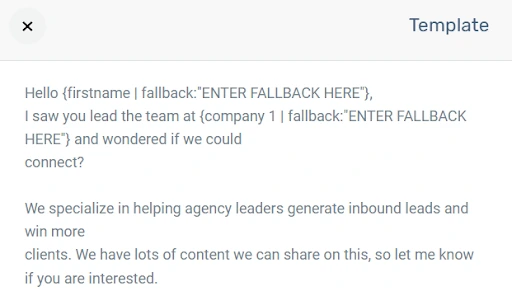
- Add Personalized Elements: Beyond the first name, add references to the prospect’s industry, recent posts, or product interests.
- Write Personalized Opening Lines: Avoid generic intros.
For instance:
“I noticed your team is expanding into APAC markets—congrats!”
- Focus on a Specific Pain Point: Make it about them, not you. Address a challenge they’re likely facing.
- Use Message Templates Smartly: LinkedFusion allows you to craft message templates that feel custom but can be automated across multiple prospects.
The Role of LinkedIn Outreach in a Multi-Channel Outreach Strategy
While email outreach remains powerful, LinkedIn outreach is just as important for B2B sales. Combining both creates a multi-channel outreach strategy that boosts visibility and response rates.
Automation tools help sales representatives manage both email and LinkedIn outreach from one place. Its ability to craft messages and sequences lets you send personalized messages at scale without looking automated.
For example:
- Step 1: Send a personalized email using LinkedFusion.
- Step 2: If no reply, trigger a personalized LinkedIn message automatically.
This level of personalization ensures your outreach efforts are consistent and impactful across channels.
Templates for Personalized Outreach: Email and LinkedIn
When you need to create personalized outreach at scale, templates help, but only if used wisely. Below are examples of effective templates:
Personalized Email Template Example:
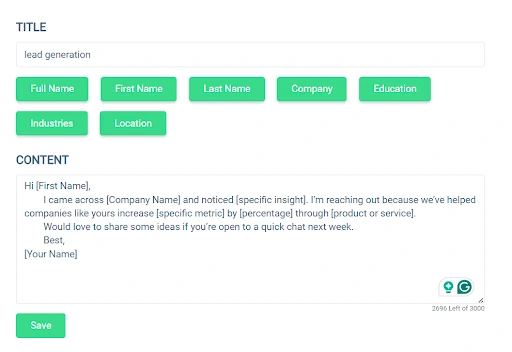
Subject Line: [First Name], a quick idea to improve [Specific Metric] at [Company Name]
Body:
Hi [First Name],
I came across [Company Name] and noticed [specific insight]. I’m reaching out because we’ve helped companies like yours increase [specific metric] by [percentage] through [product or service].
Would love to share some ideas if you’re open to a quick chat next week.
Best,
[Your Name]
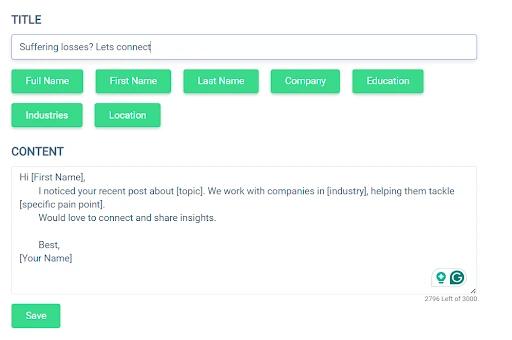
Personalized LinkedIn Message Template Example:
Hi [First Name],
I noticed your recent post about [topic]. We work with companies in [industry], helping them tackle [specific pain point].
Would love to connect and share insights.
Using Images and GIFs in Personalized Outreach
Adding images and GIFs to your personalized outreach can significantly boost prospect engagement. Visual elements not only help your emails or LinkedIn messages stand out but also add a personal touch that text alone often lacks.
In fact, according to HubSpot, personalized emails that include visuals see up to 27% higher click-through rates compared to plain-text emails. That’s a clear sign that visuals help create a stronger connection with your prospect.
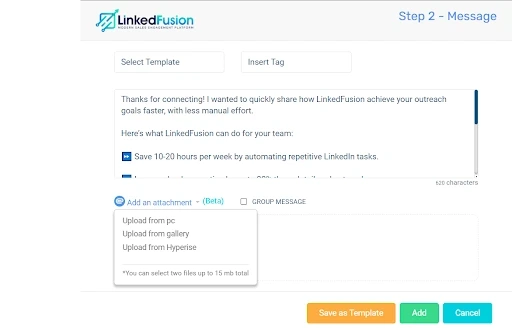
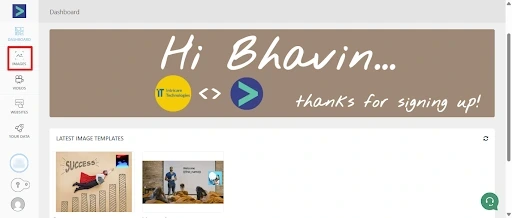
With LinkedFusion’s in-built Hyperise integration, you can incorporate dynamic images and GIFs that automatically personalize for each prospect. These images/videos show their name, company logo, or relevant product visuals directly in your outreach templates. This enhances both cold email and LinkedIn outreach campaigns, making them feel less automated and more human.
Why It Matters:
- Higher Engagement Rates: Visuals in emails and messages improve open rates, click-through rates, and reply rates.
- A Personalized Experience: Personalized visuals help your outreach resonate with each prospect’s specific pain points or interests.
- Better Brand Recall: Customized images create a memorable impression, especially in B2B outreach, where inboxes are crowded.
Best Practices:
- Use One Visual per Message: Avoid clutter—keep it clean and purposeful.
- Make It Relevant: Ensure the image or GIF supports your message, not distracts from it.
- Test Across Devices: Check how your visuals display on desktop and mobile to maintain a professional appearance.
By integrating personalized images and GIFs into your outreach strategy, you move beyond plain-text communication and create a more dynamic, impactful prospecting experience.
Why Sales Representatives Must Prioritize Personalization Over Volume?
Sending emails at scale is important for lead generation, but if those emails aren’t personalized, reply rates and engagement will suffer. Sales representatives must balance scale with personalization to ensure every prospect feels like they’re receiving a message crafted specifically for them.
Here’s how:
- Use dynamic personalization fields in tools.
- Craft templates that include a personalized approach.
- Monitor metrics like reply rates and adjust your messaging strategies accordingly.
Measuring the Success of Your Personalized Outreach Campaigns
You can’t improve what you don’t measure. Key metrics to track include:
- Open Rates: How many users opened your email using a personalized subject line?
- Reply Rates: How many prospects responded to your email or LinkedIn message?
- Conversion Rates: How many positive responses led to actual sales engagement?
LinkedFusion’s unified inbox and reporting dashboard help you monitor all these metrics, ensuring your personalization techniques lead to real results.
Final Thoughts: The Power of Personalization in Sales Outreach
Personalized outreach isn’t optional anymore—it’s the baseline for any successful sales process. Whether through email outreach or LinkedIn outreach, adding a personalized touch can be the difference between landing a deal and being ignored.
With tools like LinkedFusion, you can craft personalized messages, create message templates, and schedule emails and LinkedIn sequences—all while maintaining a human feel. Instead of relying on cookie-cutter sales emails, a personalized approach helps sales representatives build real connections that lead to business growth.
Remember: when your message resonates most with your audience, they’re far more likely to respond. Start tailoring your outreach today, track your metrics, and unlock better results with a personalized strategy that puts the prospect first.