

In the world of LinkedIn automation and lead generation, one challenge remains constant: finding quality leads efficiently while staying within budget. According to HubSpot, 61% of marketers say generating traffic and leads is their biggest challenge. Tools like LinkedIn Sales Navigator may help, but not everyone can afford the premium price.
That’s where LinkedFusion, a powerful LinkedIn automation tool, changes the game. With its inbuilt database of over 700 million LinkedIn profiles, LinkedFusion helps users bypass Sales Navigator scraping or subscriptions.
If you’re searching for an affordable, reliable LinkedIn prospecting tool that streamlines LinkedIn outreach while protecting your account, this blog is for you.
Why LinkedIn Automation Matters for Lead Search?
LinkedIn automation isn’t just about sending bulk connection requests. It’s about intelligently automating repetitive LinkedIn activities like LinkedIn lead generation, profile viewing, messaging, and lead search, all while adhering to platform safety standards.
Manual LinkedIn prospecting involves hours of searching, filtering profiles, and sending individual LinkedIn messages. For growing sales teams, that’s not scalable. With LinkedIn automation tools like LinkedFusion, you can:
- Save time with pre-built lead lists
- Target profiles using detailed filters
- Automate LinkedIn connection requests
- Reduce dependency on costly tools like LinkedIn Sales Navigator
This kind of automation platform helps B2B marketers, sales teams, and recruiters streamline their efforts while increasing efficiency.
Types of LinkedIn Automation You Should Know
Understanding the types of LinkedIn automation is essential before diving into tools like LinkedFusion. Here’s a breakdown:
- Connection Request Automation: Automate sending LinkedIn connection requests with personalized notes.
- Message Sequence Automation: Set up LinkedIn and email outreach sequences that nurture leads over time.
- Profile Visit Automation: Automate LinkedIn profile visits to increase profile views and engagement.
- Lead Search Automation: Use LinkedIn prospecting tools to find hyper-targeted profiles.
When evaluating the best LinkedIn automation tools, focus on which automation features matter most to your business needs.
How to Find Leads on LinkedIn Without a Sales Navigator?
Reddit users frequently discuss LinkedIn automation tools as popular alternatives to Sales Navigator, especially for those seeking easier lead extraction and search without its restrictions.
LinkedFusion is more than just another LinkedIn automation tool; it’s an all-in-one LinkedIn automation platform. It is known for its one-click export feature. Another standout feature is its lead search, powered by an internal database of 700 million profiles.
Why This Matters:
Most tools rely on LinkedIn Sales Navigator or scraping. That’s risky and costly. LinkedFusion’s cloud-based LinkedIn automation tool eliminates that by offering:
- Advanced Filtering: Industry, job title, location, company size, and more.
- Verified Data: Clean and regularly updated profile information.
- No Sales Navigator Needed: Cut down on extra subscriptions while keeping your LinkedIn account safe.
You can build accurate lead lists without even logging into LinkedIn Premium accounts, making LinkedFusion a unique tool designed for modern lead generation and outreach.
Why You Don’t Need LinkedIn Sales Navigator Anymore?
Reddit users often express frustration with LinkedIn Sales Navigator’s limitations, like result caps and no export options, leading many to explore automation tools as a simpler workaround for lead search and extraction.
LinkedIn Sales Navigator is useful but expensive. LinkedFusion solves three major pain points salespeople face:
- Cost: Sales Navigator plans start at $99/month. LinkedFusion offers a more affordable tool for LinkedIn automation with added functionalities.
- Compliance: Scraping tools violate LinkedIn’s TOS. LinkedFusion’s database eliminates that risk.
- Ease of Use: No more learning complicated search operators. LinkedFusion offers an intuitive UI as part of its automation platform.
If you’re exploring automation tools on the market, prioritize those offering both lead generation tools and safety for your LinkedIn account, just like LinkedFusion does.
How LinkedIn Automation Tools Work for Lead Generation?
Understanding how LinkedIn automation tools work is crucial for effective use:
- Cloud-Based Processing: LinkedFusion operates as a cloud-based LinkedIn automation tool. No browser extensions needed.
- Automated LinkedIn Actions: Like sending connection requests, viewing profiles, and sending follow-ups.
- Integrated CRM Tools: Sync leads directly to your CRM with LinkedFusion.
- Multi-Channel Outreach: Combine LinkedIn and email outreach into a single sequence.
Reddit users often mention using LinkedIn automation tools as a workaround to find and extract leads without relying on expensive databases or LinkedIn premium plans.
What is the Best Automation Tool for LinkedIn Lead Generation?
If you’re searching for the best LinkedIn automation tools, LinkedFusion ranks high. Here’s why:
- 700 Million Profile Database: No dependency on third-party scraping.
- Custom Outreach Campaigns: Tailor your LinkedIn marketing automation with smart templates.
- CRM Integration: Connect LinkedFusion with tools like HubSpot, Salesforce, Close, or Pipedrive.
- Advanced Safety Measures: Built-in usage limits to protect the safety of your LinkedIn account.
- Free Trial Available: Test the tool risk-free before committing.
- Data Security: Protects the integrity of your LinkedIn account
- User-Friendly Interface: No complex setups, plug-and-play automation features
These features make it the ideal tool for LinkedIn automation across industries, from startups to enterprise sales teams.
How to Search and Capture Leads Using LinkedFusion?
If you want to automate your LinkedIn strategy using LinkedFusion, follow these steps:
- Sign Up for a Free Trial
Test the platform’s full capabilities without paying upfront.
- Set Up Your LinkedIn Account
Securely connect your LinkedIn profile to LinkedFusion.
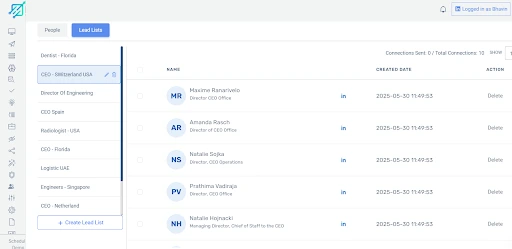
- Use the Lead Search Feature
Build lead lists using advanced filters. No Sales Navigator required.
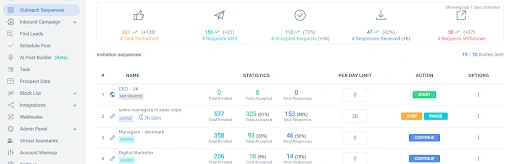
- Create Outreach Campaigns
Set up multi-touch outreach campaigns combining LinkedIn messages and emails.
- Monitor and Optimize
Use LinkedFusion’s dashboard to track campaign performance and make adjustments.
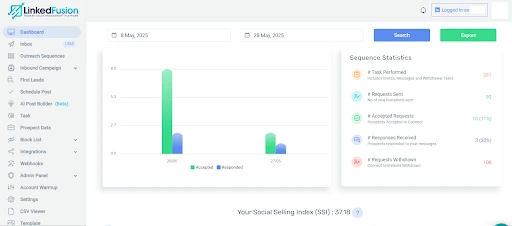
This automation platform that helps streamline lead generation will save hours per week while improving conversion rates.
Why Automating LinkedIn Prospecting Is Essential for Modern Sales Teams?
Manual prospecting is inefficient, especially when managing multiple LinkedIn accounts or scaling efforts. Automation helps solve this by:
- Reducing human error
- Increasing outreach volume safely
- Allowing better lead nurturing through consistent LinkedIn and email follow-ups
- Saving budget on tools like LinkedIn Sales Navigator
LinkedIn automation software like LinkedFusion is a proven prospecting tool that enables modern sales teams to succeed in today’s competitive B2B landscape.
How to Automate LinkedIn Connection Requests with a LinkedIn Automation Tool?
1. Choose a Reliable LinkedIn Automation Tool
Use a cloud-based platform like LinkedFusion rather than browser extensions. Cloud-based tools help maintain the safety of your LinkedIn account while running in the background.
2. Set Up Your LinkedIn Account on the Tool
Connect your LinkedIn profile securely. Make sure the tool uses encrypted login methods to protect your data.
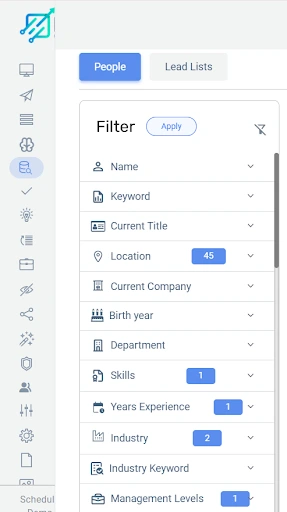
3. Define Your Target Audience Using Filters
Use lead search features in tools like LinkedFusion that access inbuilt databases (LinkedFusion, for example, offers 700 million profiles). Apply filters: job title, industry, location, company size, etc.
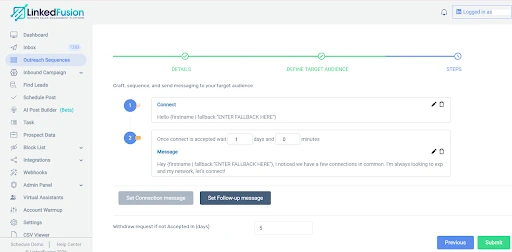
4. Create Personalized Connection Message Templates
Write custom notes for each connection request. Example: “Hey {firstname | fallback:”ENTER FALLBACK HERE”}, I noticed we have a few connections in common. I’m always looking to expand my network, let’s connect!”
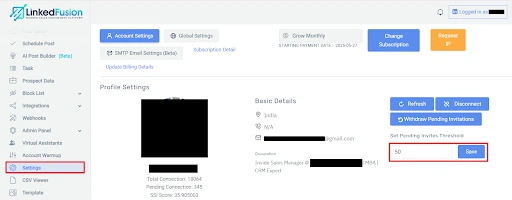
5. Set Daily Limits for Connection Requests
LinkedIn allows around 20–100 connection requests per day, depending on your account status. Tools like LinkedFusion automatically manage these limits to avoid triggering LinkedIn’s spam filters.
6. Launch Your Automated Outreach Campaign
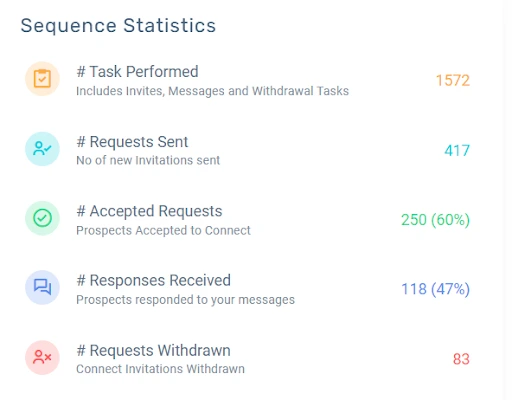
Start the campaign in your tool’s dashboard. Monitor stats like pending requests, accepted connections, and follow-up responses.
Conclusion: Stop Overpaying for Sales Navigator—Switch to LinkedFusion
If you’re serious about LinkedIn lead generation, there’s no reason to rely solely on LinkedIn Sales Navigator anymore. Tools like LinkedFusion offer a more affordable, safer, and smarter way to handle everything from lead search to LinkedIn outreach.
With its massive profile database and robust automation features, LinkedFusion stands out as one of the best LinkedIn automation tools available today.
Whether you’re a startup founder, a recruiter, or part of an enterprise sales team, LinkedFusion is the LinkedIn automation tool designed to make lead generation and outreach easier, faster, and more effective.