


A staggering 67% of marketers say that improving conversion tracking is critical to proving ROI. Without reliable LinkedIn conversion tracking, you’re flying blind — wasting ad spend and missing out on high-quality leads. Whether you’re running LinkedIn ad campaigns to drive B2B traffic, gather form submissions, or boost website conversions, knowing how to track conversions can dramatically improve campaign performance.
In this comprehensive guide, we’ll break down the most effective methods to set up conversion tracking for LinkedIn, explore tools like LinkedFusion, and show you how to connect the dots between clicks and conversions.
What is LinkedIn Conversion Tracking & Why Is It Crucial?
LinkedIn conversion tracking is a system that allows advertisers to measure the outcomes of their LinkedIn ads — from clicks to conversion events like form submissions, landing page visits, or making a purchase. This process sends conversion data back to your LinkedIn campaign manager, helping you understand which ad campaign or conversion type is delivering the best results.
Absolutely. With over 1 billion professionals, LinkedIn is a goldmine for B2B lead generation. You can use LinkedIn to run targeted ads, automate outreach, and capture intent-driven actions using tools like LinkedFusion and Campaign Manager.
Here’s why it works:
- Filters by job title, industry, and company size
- Higher intent audience than other platforms
- Rich conversion data for optimization
- Strong trust and professional credibility
Why it matters:
- Optimize your LinkedIn ad budget
- Track ROI with accurate conversion data
- Identify which campaigns drive high-quality leads
- Adjust targeting and ad formats based on real performance
Is LinkedIn Good for Finding Leads?
Absolutely. With over 1 billion professionals, LinkedIn is a goldmine for B2B lead generation. You can use LinkedIn to run targeted ads, automate outreach, and capture intent-driven actions using tools like LinkedFusion and Campaign Manager.
Here’s why it works:
- Filters by job title, industry, and company size
- Higher intent audience than other platforms
- Rich conversion data for optimization
- Strong trust and professional credibility
How to Track Leads from LinkedIn?
Tracking leads effectively requires a combination of tools, tags, and tracking setup. Here are the essential steps:
1. Install the LinkedIn Insight Tag
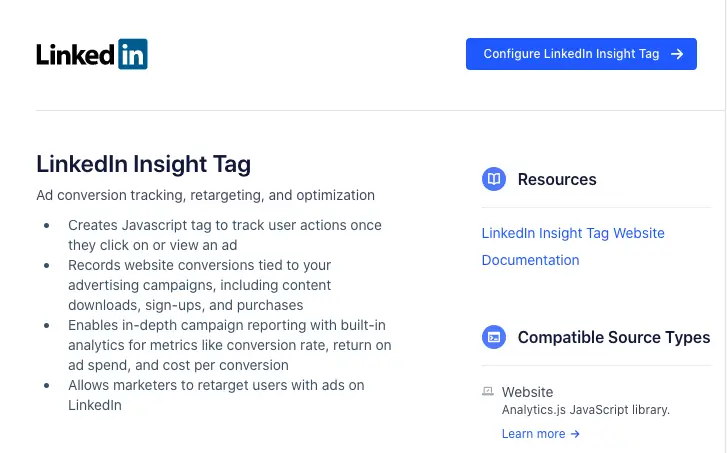
The LinkedIn Insight Tag is a lightweight JavaScript tag that you embed on your landing page or website. It lets you track website conversions, retarget users, and gather conversion metrics from your LinkedIn ads.
Steps to Install:
- Log in to LinkedIn Campaign Manager
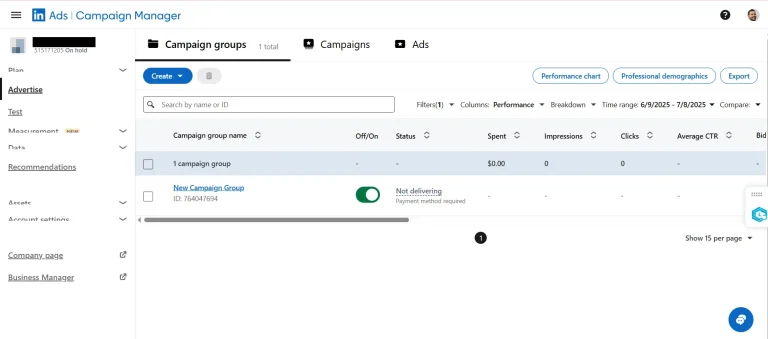
- Navigate to your account and click “Install Insight Tag.”
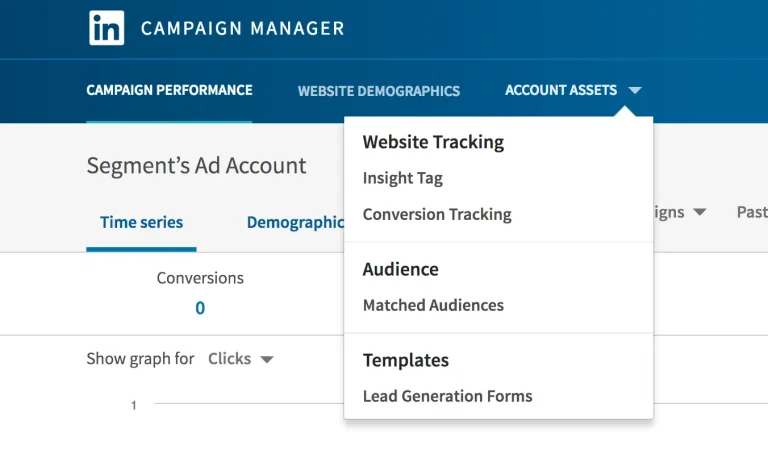
- Copy the code and add it to your website’s footer manually or via Google Tag Manager
- Verify the tag status within the Campaign Manager
Pro Tip: Use CRM tools like Google Tag Manager or Meta Pixel to simplify tag deployment and avoid manual errors.
2. Set Up Conversion Tracking in LinkedIn Campaign Manager
After installing the Insight Tag, you need to define your conversion actions.
How to Set Up:
- Go to Campaign Manager and select your ad account
- Click on “Conversions” under the “Account Assets” tab
- Choose your conversion type (e.g., form submission, landing page visit, etc.)
- Set parameters like conversion window, attribution model, and conversion value
- Associate the conversion event with your running or upcoming LinkedIn ad campaign
Reddit users say tracking conversions on LinkedIn usually means installing the Insight Tag and setting up conversion actions—but many find the setup confusing and the results inconsistent. So refer the above steps to track them.
How to track conversions on LinkedIn?
byu/MustacheManiaDotCom inGoogleTagManager
Use the LinkedIn Conversions API for More Accurate Tracking
If you want to go beyond browser-based tracking and add offline conversions, use the LinkedIn Conversions API. This allows you to send conversion data to LinkedIn from your CRM or backend server — giving you accurate tracking even when cookies are blocked.
Benefits:
- Track event-specific conversions like phone calls or in-store visits
- Send conversion insights directly to LinkedIn
- Maintain accuracy across devices and browsers
Reddit users complain that LinkedIn’s conversion tracking is so unreliable and opaque that they’d rather focus on engagement metrics like view rate and dwell time instead. Read the next section to understand how to best make use of LinkedIn conversion tracking.
Is LinkedIns conversion tracking any good??
byu/Kind-Engine5174 inLinkedinAds
Best Practices for LinkedIn Conversion Tracking
- Choose the Right Attribution Model
Your attribution model affects how you credit conversions — whether by last click, last view, or a custom rule. For B2B lead generation, where the sales cycle is longer, consider a longer conversion window (e.g., 30-90 days).
- Track User Actions Across Funnel
Don’t just track clicks — monitor form submissions, page scrolls, and downloads to understand conversion types and behaviors across your LinkedIn campaigns.
- Run A/B Tests and Optimize
Track how different ad formats perform for various job titles, audiences, or offers. Use conversion tracking to test messaging, visuals, and CTAs.
- Use Conversion Segmentation
Separate conversion events like eBook downloads vs. demo requests to refine retargeting and improve ROI.
Best Tools to Track LinkedIn Ads Conversions
Let’s look at the top tools that help you track conversions and optimize your LinkedIn ad performance.
1. LinkedFusion
LinkedFusion is a powerful tool designed for lead generation and conversion tracking via LinkedIn. It integrates with your CRM and automates outreach, follow-ups, and campaign tracking.
Key Features:
- Automates personalized LinkedIn outreach
- Tracks LinkedIn conversions from prospecting to deal closure
- Integrates with CRMs like HubSpot, Pipedrive, and Salesforce
- Offers unified inbox and reporting dashboard
- Helps track LinkedIn lead gen forms, responses, and link clicks
How it helps: LinkedFusion provides a comprehensive view of your lead funnel, helping marketers understand how LinkedIn campaigns are performing and which conversion events drive results.
2. LinkedIn Campaign Manager
The built-in Campaign Manager offers all the tools to set up conversion tracking, set goals, and view conversion metrics.
Key Benefits:
- Access to the LinkedIn ads dashboard
- Customize and track conversions by type (e.g., form, visit, purchase)
- View performance by ad, audience, and placement
- Directly link to LinkedIn Insight Tag
Pro Tip: Regularly log in to LinkedIn Campaign Manager and select your top campaigns to review performance against conversion goals.
3. Google Tag Manager (GTM)
If you’re using multiple tracking platforms, GTM makes it easier to manage and deploy tags without developer help.
Why It’s Useful:
- Manages the LinkedIn Insight Tag alongside Google Analytics, Facebook Pixel, etc.
- Tracks specific conversion actions like button clicks or form entries
- Supports triggers for event-specific conversion tracking
Tip: Use GTM to implement advanced tracking logic and reduce tag duplication across your ad campaigns.
4. HubSpot or Your CRM with LinkedIn API
Using a CRM like HubSpot with the LinkedIn Conversions API lets you track offline conversions, enrich leads, and get a full conversion tracking view from ad click to closed deal.
Key Benefits:
- Map conversion type to CRM stages
- Track leads who converted after calls or emails (offline)
- Sync conversion data directly into LinkedIn for better attribution
Use Case: You can set an attribution rule where a form submission is a soft conversion, and making a purchase is a final conversion.
What is the Best LinkedIn Tool for Lead Generation?
While there are several options, LinkedFusion stands out due to its deep integration with LinkedIn campaigns, CRMs, and its ability to track leads throughout the funnel. Combined with Campaign Manager and Insight Tag, it gives marketers everything they need to generate and track conversions effectively.
Conclusion
If you’re investing in LinkedIn advertising, don’t leave performance to chance. With accurate conversion tracking, you can measure ROI, fine-tune your LinkedIn ad campaign, and generate quality LinkedIn leads that convert.
From installing the LinkedIn Insight Tag using LinkedFusion, to tapping into the Conversions API, you now have a complete roadmap to improve your lead generation and boost LinkedIn ads conversions.
So the next time you launch a LinkedIn ad, don’t just hope for results — track conversions, attribute value, and scale what works.