

LinkedIn has become the “chosen” platform for B2B outreach, sales prospecting, and professional networking. As more users turn to automation tools to scale their activities, LinkedIn is cracking down hard on anything that violates its terms of service.
If you’re using automation to connect, message, or engage on LinkedIn, you must understand how to keep your LinkedIn account safe from detection and penalties. One wrong move could get your account restricted or even banned.
Here’s your guide to maintaining a healthy, secure, and effective LinkedIn presence while using automation wisely.
Why LinkedIn Accounts Get Restricted?
LinkedIn is serious about maintaining a trusted and authentic platform. Accounts can be restricted when certain behaviors raise red flags, whether due to poor engagement, unusual activity, or technical anomalies. Here’s what to watch out for:
We've restricted your account temporarily
We noticed unusual activity from your account. This includes an unusually large number of profile views and/or viewing patterns that indicate the use of an
automated tool.
To help guard against abuse and to protect Member privacy, we don’t permit the use of software tools that automate activity on LinkedIn. We also limit accounts from viewing an unusually large number of Member profiles.
We showed you a warning about this previously, so for now, we have restricted your account until January 20, 2023 12:00 AM PST. Please try signing in again after this time, and note that engaging further in such activity may result in permanent restriction of your account.
For more details, please visit our Help Center.
1. Poor Engagement Signals
LinkedIn monitors how others interact with you. Negative engagement metrics can signal that your outreach is unwanted or spammy:
- Low acceptance rate on your connection requests
- Frequent “I don’t know this person” responses
- Messages often marked as spam or ignored
If too many people reject or report your interactions, your account may be flagged for suspicious behavior.
2. Violations of Activity Guidelines
LinkedIn sets soft and hard limits on activity to prevent abuse. Breaking these can trigger immediate restrictions:
- Sending more connection requests than allowed in a week
- Sudden increases in profile visits, messages, or connection attempts
- Using fake names, impersonation, or misleading profile information
- Mass-sending identical messages to multiple users in a short time
Consistency, authenticity, and moderation are key to keeping your LinkedIn account safe.
3. Technical Red Flags
LinkedIn also looks at how and where you access the platform. Certain technical behaviors may appear suspicious:
- Using VPNs or proxies that change your login location frequently
- Logging in from multiple devices or locations at the same time
- Running browser extensions or third-party tools that interact with LinkedIn
These actions can create digital footprints that resemble bot activity, putting your account at risk, even if your intent is harmless.
Reddit users confirm that LinkedIn has become more sophisticated at detecting automation tools, using behavioral patterns and browser activity to flag non-human interactions, making it essential to use compliant tools with randomized, human-like actions.
LinkedIn now detects automation software?!
byu/FoodOk8635 inGrowthHacking
Ways to Keep Your LinkedIn Account Safe
1. Stay Away from Cheap or Browser-Based Tools
Many free or low-cost LinkedIn automation tools work as browser extensions. These tools inject code directly into your LinkedIn session, which makes them extremely easy for LinkedIn to detect.
Why it’s dangerous: LinkedIn monitors for bot-like behavior, and these tools leave obvious digital footprints.
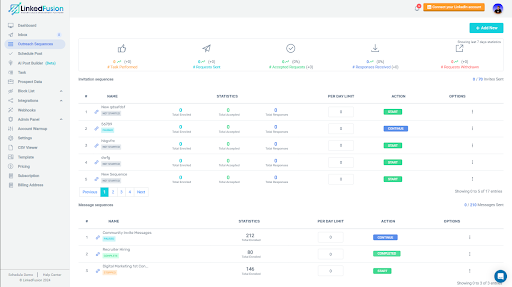
Pro tip: Use trusted, cloud-based automation tools like Linkedfusion that simulate human behavior, offer built-in safety settings, and operate discreetly in the background. This is a key move to keep your LinkedIn account safe.
2. Follow LinkedIn’s Daily Activity Limits
LinkedIn monitors your daily activity and has unofficial thresholds. Excessive actions can trigger red flags and jeopardize your account.
Safe daily limits:
- Connection requests: Up to 80–100
- Messages: Up to 150–200
- Profile visits: Up to 250–300
- InMail limits: 20-50 InMail credits by Sales Navigator
- Activity consideration: Around 250 per day
Pro tip: Spread these actions evenly over a 10–12 hour period. Bursts of rapid activity can look suspicious and undermine efforts to keep your LinkedIn account safe.
3. Rotate and Personalize Your Messages
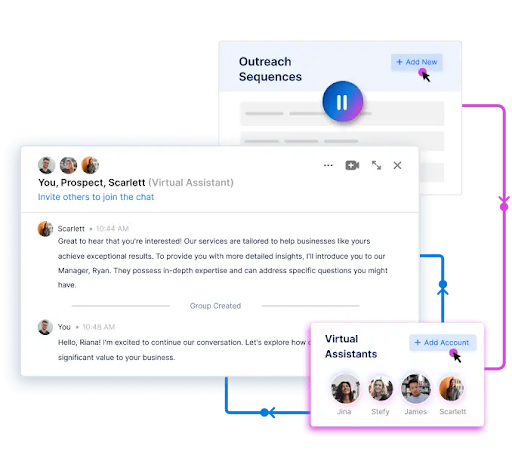
Copy-pasting the same message to hundreds of profiles screams automation. LinkedIn’s algorithms are smart enough to detect when similar messages are being sent in bulk from a single account. These algorithms can detect repetitive outreach and limit your messaging ability.
Repetitive, templated outreach not only hurts your response rates but can also put your account at risk. LinkedIn values meaningful engagement and it shows. When your messages are accepted, LinkedIn often rewards you by returning InMail credits, making high-performing outreach more cost-effective. That’s why using tools that help you craft personalized, high-converting messages is more important than ever.
Pro tip: Use spintax or AI-powered content variation to personalize your messages. Vary greetings, sentence structure, and calls to action to make each message feel organic. This micro-mini step plays a big role in keeping your LinkedIn account safe.
4. Use a Dedicated IP or Residential Proxy
LinkedIn tracks where and how you log in. If your automation tool operates from a country or IP address different from your usual one, that inconsistency may raise red flags.
Pro tip: Run your automation tools from a dedicated IP address or a residential proxy in your region. This keeps your digital footprint consistent and helps keep your LinkedIn account safe.
5. Warm Up New Accounts Gradually
A brand-new LinkedIn account blasting out 100 messages and 50 connection requests per day will be flagged immediately.
Pro tip:
- Week 1: 5–10 connection requests/day, manual engagement only
- Week 2: Increase to 15–20/day, mix in profile visits
- Week 3: Light messaging and safe automation
- Week 4+: Slowly ramp up to full capacity
By pacing your activity, you allow LinkedIn to trust your profile, which helps keep your LinkedIn account safe from the start.
6. Limit Device and Location Switching
Logging into your account from multiple devices or countries in a short time frame can look suspicious.
Pro tip: Stick to 1–2 devices and ensure your automation tool operates from a location close to your regular one. Consistency is key to keeping your LinkedIn account safe.
7. Turn On Two-Factor Authentication (2FA)
Automation aside, hacking and phishing threats are real. Enabling two-factor authentication creates an added layer of security to your account.
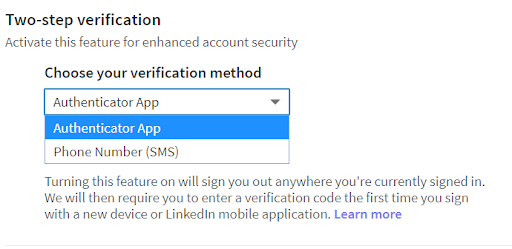
Pro tip: Go to your LinkedIn settings and activate 2FA using your phone or an authenticator app. It’s a quick, effective way to help keep your LinkedIn account safe from unauthorized access.
8. Watch for LinkedIn Warning Signs
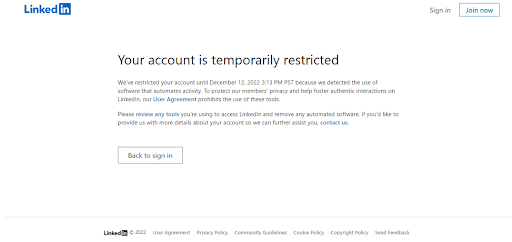
If LinkedIn detects unusual behavior, they often issue warnings before applying restrictions. Be on the lookout for:
- “Unusual activity” alerts
- Sudden drops in reach or engagement
- Temporary restrictions on messaging or connecting
Pro tip: If you see these signs, pause all automation immediately and resume manual use until the account stabilizes. Ignoring LinkedIn warnings can lead to permanent loss, so take them seriously to keep your LinkedIn account safe.
9. Maintain a High SSI score
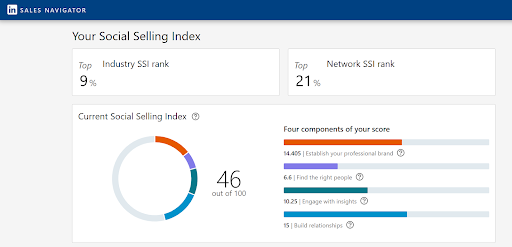
LinkedIn’s Social Selling Index (SSI) isn’t just a vanity metric, it can directly impact how much you can do on the platform. Check your SSI from this site: https://www.linkedin.com/sales/ssi
- Higher SSI scores often come with more flexibility, including increased connection limits and broader visibility. Refer to a social selling guide to improve your score.
- By optimizing your profile, actively engaging with your network, and consistently sharing valuable content, you can boost your SSI and unlock more LinkedIn features.
In short, the better your presence, the fewer the restrictions.
Reddit users say to keep your LinkedIn safe from false automation flags, avoid aggressive activity spikes, limit daily actions, and stick to trusted tools with human-like behavior settings.
My account gets restricted because of false “automation tools” claims
byu/Rob130301 inlinkedin
Understanding LinkedIn Restrictions vs. Suspensions
Not all LinkedIn penalties are created equal. It’s important to know the difference between a temporary restriction and a permanent suspension:
- Account restrictions are usually short-term, lasting 24–48 hours, and serve as a warning.
- Suspensions, on the other hand, are permanent bans typically the result of repeated violations or serious breaches of LinkedIn’s policies.
- Most restrictions can be resolved by adjusting your behavior and allowing your account to cool down.
- Creating a new account while restricted is risky; it can trigger a permanent ban across all your accounts.
- LinkedIn generally follows a clear process: it will warn you about unusual outreach activity, temporarily restrict your account, and only move to suspension if the behavior continues.
Knowing the difference and responding appropriately can help you keep your LinkedIn account safe and active.
Reddit users say if your LinkedIn account gets restricted or banned, the best move is to stop all automation, file a support ticket with detailed context, and avoid repeated login attempts to prevent further flags.
Mega Thread: So your account has been restricted, banned, hacked, or otherwise made inaccessible…
byu/thejournalizer inlinkedin
Final Thoughts
Automation can supercharge your LinkedIn strategy, but only when used responsibly. To keep your LinkedIn account safe, you must combine the right tools with the right tactics.
Avoid shortcuts, respect LinkedIn’s limits, and always prioritize authenticity. With the right setup, you can automate efficiently, scale your outreach, and grow your network—without putting your account at risk.
Need help building a compliant outreach system that keeps your LinkedIn account safe? Let’s connect. We can help you do it the smart way.