


Let’s be real: when it comes to LinkedIn prospecting, this platform is where the magic happens. It’s not just for updating your profile or scrolling through industry news. LinkedIn is a powerful sales prospecting tool that, when used strategically, can transform cold leads into warm prospects—and eventually, loyal customers.
Why focus on prospecting on LinkedIn? With over 1 Billion users, many of whom are key decision-makers, LinkedIn is the go-to channel for B2B sales professionals. In fact, reps who consistently engage in social selling on LinkedIn are 50% more likely to hit their sales quota. That’s the kind of ROI you can’t ignore.
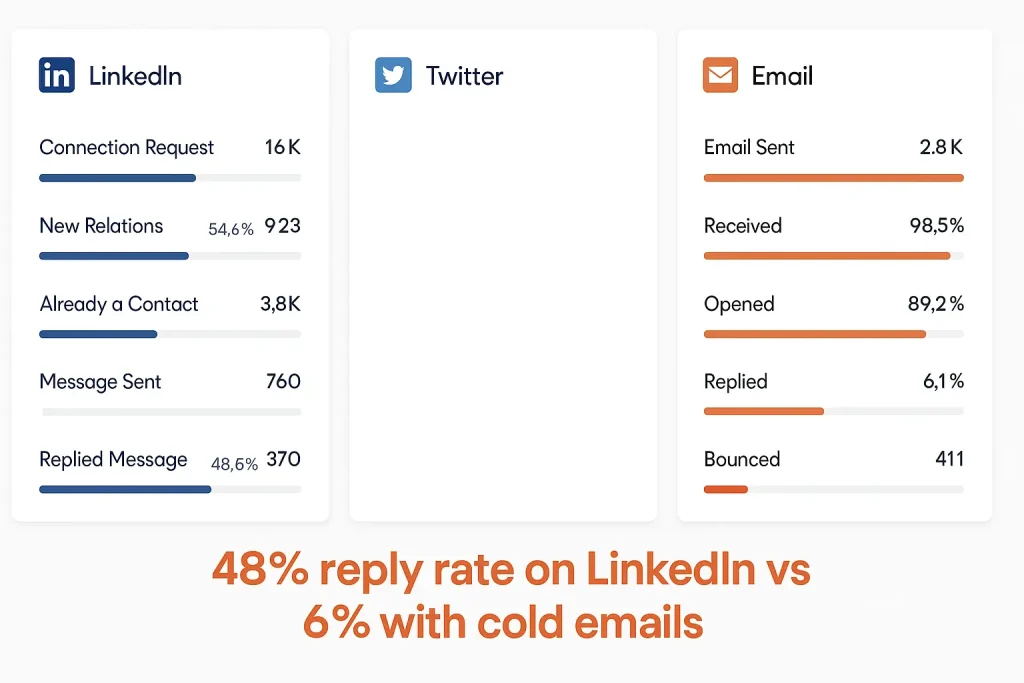
This image compares engagement metrics across LinkedIn, Twitter, and Email, highlighting a significantly higher reply rate on LinkedIn (48.6%) compared to cold emails (6.1%), with Twitter showing no data. The visual emphasizes LinkedIn’s effectiveness for outreach. Sounds convincing? Say thanks to prospecting.
LinkedIn prospecting means strategically finding and contacting potential clients on LinkedIn. It rejects spammy, generic outreach in favor of meaningful engagement that converts prospects into customers. Success requires a mix of smart list-building, persuasive copywriting, and efficient automation.
Ready to master how to prospect on LinkedIn? Let’s walk through each step you can take to start using LinkedIn like a pro and close more deals using the platform.
- Sales Training: Learning how to use LinkedIn effectively is key for closing leads and boosting your sales performance.
- Engage with Posts on LinkedIn: Regularly posting and engaging with content can help expand your reach and attract leads based on your expertise.
- Use InMail & Direct Messages Wisely: Personalizing every message you send on LinkedIn is crucial to building trust and encouraging prospects to accept your connection request.
- Leverage LinkedIn’s Tools: LinkedIn gives valuable tools like Sales Navigator and lead filters to help identify and connect with potential clients, making it easier to close sales.
- Stay Active & Update Your Profile: Consistently staying engaged and keeping your profile updated ensures that you make a good first impression and maximize your reach.
Step 1: Optimize Your LinkedIn Profile for Sales Success
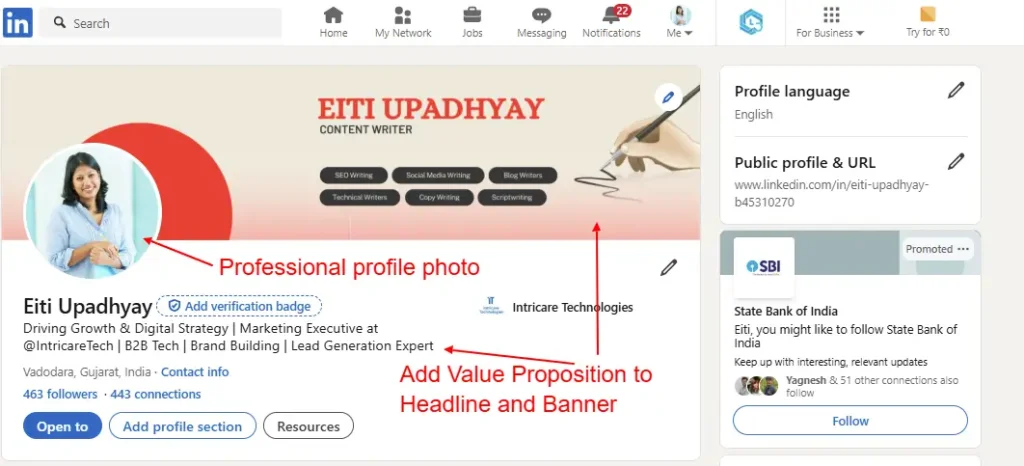
Before diving into LinkedIn prospection, make sure your profile is working for you—not against you. Your LinkedIn profile is your digital handshake and first impressions matter.
Tips for profile optimization:
- Professional profile photo: A high-quality headshot builds instant trust with prospects.
- Value-driven headline: Instead of just your title, use a headline that speaks to how you help clients (e.g., “Helping SaaS Companies Increase Revenue Through Strategic Prospecting”).
- Prospecting-ready summary: Your summary should clearly show the value you bring. Make it about the buyer—not just your career.
- Case studies and media: Showcase success stories, presentations, or testimonials that support your sales credibility.
An optimized profile lays the foundation for successful LinkedIn sales prospecting by building trust from the first click.
Step 2: Build Your Network and Start LinkedIn Prospecting
Now that your LinkedIn profile is shining, it’s time to do some prospecting. LinkedIn isn’t just a fancy online resume; it’s a Pandora’s box for finding your ideal customer and expanding your network.
Use LinkedIn Sales Navigator for Prospecting
One of the most powerful LinkedIn prospecting tools is Sales Navigator. With its high-tech search filters, you can find leads by industry, title, geography, company size, and more.
- Target high-intent leads based on job changes and engagement.
- Save prospects and get real-time alerts on their activity.
- Discover similar accounts using LinkedIn’s algorithmic lead recommendations.
This is how to use LinkedIn Sales Navigator for prospecting like a pro.
Build Your Network Through Smart Connections
Effective prospection LinkedIn strategy involves more than just sending connection requests.
- Engage with posts and leave thoughtful comments.
- Connect with mutual connections or active members in LinkedIn Groups.
- Personalize your outreach to make an authentic first impression.
When you treat LinkedIn prospecting as relationship-building, not just lead-gen, your results will skyrocket.
Step 3: Use LinkedIn Content to Engage and Attract Prospects
Now that you’ve connected with the right people, how do you keep their attention? Easy—by creating content that speaks to them. Content is the lifeblood of social selling on LinkedIn. Posting daily builds your personal brand and attracts prospects to you.
- Create content that sells: Forget the hard-sell posts. Focus on social selling content that actually helps your target audience. Share tips, industry insights, and solutions to common pain points that your prospects might face. Remember, the agenda is to educate, not just to pitch.
- Engage like a salesperson, not a bot: Consistency is key. Regularly share posts, comment on others’ updates, and engage with your network. The more you show up in their inbox or newsfeed, the more familiar you’ll become—and people like buying from people they know.
- Content formats that work: Mix it up! Use LinkedIn articles, posts, polls, and videos to showcase your expertise. Don’t be afraid to share your opinion on industry trends. The more value you provide, the more likely your prospects are to reach out when they need a solution.
Creating content that’s valuable, engaging, and solves your prospects’ problems is key to driving inbound leads.
Step 4: Using LinkedIn Sales Navigator for Effective Sales Prospecting
Want to know how to use LinkedIn for sales prospecting at scale? Sales Navigator is your secret weapon. It’s like having an assistant who can show you exactly which leads are hot and when to reach out.
- Maximize LinkedIn Sales Navigator: With LinkedIn Sales Navigator, you can save leads, set alerts, and use lead recommendations to find similar prospects. It’s like being handed a roadmap to your next sale.
- Track job changes and activity: One of the best things about LinkedIn Sales Navigator is its ability to notify you when a prospect changes jobs or shares something relevant. This is the perfect time to reach out and offer a solution to fit their new role.
- Save leads for follow-up: Got a good lead but not ready to reach out just yet? No problem. Sales Navigator lets you save that lead and keep track of any updates. When the time is right, you’ll be ready to jump in.
The right LinkedIn prospecting tools can drastically improve your efficiency and effectiveness.
Step 5: Use LinkedIn InMail for Personalized Sales Outreach
Knowing how to approach a prospect on LinkedIn can make or break your outreach success. Let’s talk about LinkedIn InMail—your direct line to prospects’ inboxes. It’s a powerful tool, but you gotta be smart with it. If you come in hot with a hard sales pitch right away, your InMail will get ignored faster than a Monday morning email.
InMail, when done right, is one of the best tools for LinkedIn prospecting outreach. Here’s how to do it right:
The key to making LinkedIn InMail work for you is to offer something valuable before you even think about pushing your product. It’s all about building that trust first. Think about the prospect’s profile and craft a message that shows you’ve done your homework. You want them to feel like you’re talking to them, not just sending out mass emails. Personalization is your friend here.
Best Practices for Salespeople:
- Avoid jumping into a sales pitch. No one likes getting a pitch from someone they just met. Start by offering helpful content, a free resource, or even a friendly conversation.
- Personalize each message. Check out the prospect’s industry and pain points. Tailor your message to their pain points, and use their name—it’s a small touch that goes a long way.
- Use a clear CTA. Always include a call to action that’s simple and clear. Whether it’s asking for a quick call, offering more info, or even just inviting them to connect further, make sure the next step is obvious.
InMail can be your secret weapon for selling on LinkedIn if you use it to build real, value-driven connections rather than jumping straight into a sale. Trust me—this approach is how you turn cold leads into warm prospects.
Step 6: Leverage LinkedIn to Move Relationships Offline
At the end of the day, sales happen when relationships go from online to offline. Sure, you can nurture leads on LinkedIn, but sooner or later, you’ve gotta take that conversation to the next level—whether it’s hopping on a call or meeting face-to-face (or Zoom-to-Zoom, let’s be real).
Why You Need to Build Real Relationships: LinkedIn is great for starting conversations, but real business relationships are built through actual human interaction. The goal here is to get your prospects comfortable enough to move beyond LinkedIn and start a more in-depth conversation. This is where deals really start to happen.
Tips for Sales Professionals:
- Take it offline early. Don’t be afraid to suggest a call or meeting once you’ve established some rapport. It shows you’re serious about helping, not just selling.
- Be casual but professional. Keep it human. Whether you’re asking for a call or an in-person meeting, don’t sound too formal. A relaxed tone will make it more likely that your prospects will say yes.
- Maintain the relationship over time. After the first call or meeting, follow up. Keep providing value without pushing too hard. Sales managers who nurture relationships long-term often see more success in closing deals.
Getting someone out of their LinkedIn inbox and into a real conversation is a game-changer for your LinkedIn sales prospecting efforts. Once you’ve made that connection, closing the deal becomes a whole lot easier.
Step 7: Consistency is Key to Social Selling on LinkedIn
The golden rule of social selling? Consistency. It’s not enough to just pop up on LinkedIn once in a while, throw out a few connection requests, and call it a day. You need to be present, engage regularly, and build a social selling index that shows you’re in it for the long haul.
- Consistency Builds Trust: When you post consistently and engage with others, you’re building trust. People start to recognize your name, and they associate it with valuable insights. Whether it’s commenting on posts, sharing industry news, or responding to messages, staying active keeps you top of mind with prospects.
- Track Your Results: Don’t just post and forget. Measure your success by tracking things like connection growth, post engagement, and the number of inbound leads you’re getting. This will help you see what’s working and where you need to adjust your approach.
- Continuous Improvement: Use your results to keep refining your LinkedIn sales strategy. Did a certain type of post get more engagement? Did a particular message get a higher response rate? Keep tweaking your strategy based on what the data shows.
Sales reps who are consistent on LinkedIn—whether it’s with posting, commenting, or sending messages—are the ones who stand out in the long run. Stay active, and watch your social selling efforts pay off using these LinkedIn prospecting strategies.
Conclusion: Why LinkedIn is Essential for Sales Success
If you’re serious about increasing sales, mastering how to use LinkedIn for sales prospecting is non-negotiable. By optimizing your approach, using the right LinkedIn prospecting tools like LinkedFusion, and building genuine connections, you can turn LinkedIn into a consistent source of high-converting leads.
LinkedIn prospecting isn’t just a nice-to-have feature—it’s a critical part of any modern sales strategy. So take these tips, start implementing them today, and watch your prospecting pipeline grow.
Frequently Asked Questions
How can I effectively use LinkedIn for sales prospecting?
LinkedIn allows you to leverage sales prospecting by helping you connect with decision-makers and potential leads. Start by building a LinkedIn profile that clearly shows your value proposition. Use LinkedIn’s search filters to target specific industries or roles, and don’t forget to send personalized messages when reaching out. LinkedIn Sales Navigator is especially useful for identifying and engaging with the right people.
What are the best ways to use LinkedIn to reach my target audience?
There are many ways to use LinkedIn to reach your target audience. Posting content on LinkedIn that adds value, staying active in relevant groups, and sharing industry insights can help you connect with your ideal customers. It’s also a good idea to use InMail for more personalized outreach. By tracking lead generation and engagement through CRM tools, you can refine your strategy and better understand what resonates with your audience.
How do I optimize my LinkedIn profile for sales success?
For sales success, your LinkedIn profile should make a great first impression. Include a professional profile picture, a compelling headline, and a summary that highlights how you help potential customers. LinkedIn allows you to export recommendations and endorsements, which can add credibility. It’s also important to keep your profile page updated with your latest achievements and skills to help you stand out in search results.
What are some tips for using InMail to connect with prospects on LinkedIn?
When using InMail, it’s crucial to send a personalized message that addresses the recipient’s specific needs. LinkedIn allows you to target your messages to the right decision-makers, so make sure to do your research. Your message should offer value right away and include a clear call to action to encourage further engagement. Always aim for a good first impression by being concise and respectful of the prospect’s time.
How can sales managers use LinkedIn to improve team performance?
Sales managers can use LinkedIn to streamline team efforts by incorporating CRM tools to track progress and performance. Encouraging your team to share relevant content and engage with potential customers regularly helps build brand visibility. LinkedIn Sales Navigator can help the team identify leads more efficiently, and regular sales conversations on the platform can expand your team’s potential reach.
What are the top LinkedIn profile tips for attracting your ideal customer?
To attract your ideal customer, make sure your LinkedIn profile clearly demonstrates how you solve problems. Include case studies, client testimonials, and industry-relevant projects that showcase your expertise. It’s also essential to add a personalized touch by sharing your unique value in your summary. Keeping your profile page updated and engaging with users through thoughtful content ensures you stay relevant to your target audience.
How do I manage my LinkedIn inbox to streamline my sales process?
Managing your LinkedIn inbox efficiently can significantly boost your sales process. Use LinkedIn’s filters to easily find important messages, set reminders for follow-ups, and categorize conversations based on their stage in the sales cycle. LinkedIn allows you to tag connections and save conversations, which helps keep your outreach organized. This helps you ensure timely responses and prevents potential deals from slipping through the cracks.