

LinkedIn is more than just a networking site—it’s a powerful LinkedIn prospecting tools available for modern sales professionals. If you’re serious about social selling, leveraging LinkedIn is non-negotiable. This guide will show you how to use LinkedIn to attract prospects, build relationships, and close deals like a pro with the right LinkedIn sales tools.
Key Benefits You’ll Gain with LinkedIn prospecting Tools:
- Increased visibility among potential prospects
- Efficient prospecting with LinkedIn Sales Navigator
- Stronger relationships through personalized outreach
- Higher conversion rates by leveraging LinkedIn’s features
Why LinkedIn is the Best Sales Tool for Prospecting
Leveraging LinkedIn as a Powerful Sales Tool: Why it Stands Out in the Market
LinkedIn is the go-to platform for B2B sales prospecting, and here’s why:
- Professional Network: LinkedIn is designed for business professionals, making it easier to connect with decision-makers.
- Advanced Search Filters: Find prospects based on job title, industry, company size, and more.
- Social Selling Environment: Build relationships through meaningful interactions, not just cold pitches.
| Feature | Benefit |
|---|---|
| Advanced Search Filters | Allows targeted prospecting based on multiple criteria |
| Sales Navigator | Provides lead recommendations and detailed insights |
| People Also Viewed Sidebar | Uncovers additional prospects similar to your target |
LinkedIn for Sales Prospecting: Understanding the Unique Advantages
LinkedIn’s power lies in its ability to help you deeply understand your prospects:
- In-depth Research: View your prospect’s profile to understand their career journey, skills, and interests.
- Content Engagement: Monitor what content they share and engage with to identify their pain points.
- Mutual Connections: Use shared connections to get introductions and build trust faster.
Top Tips for LinkedIn Sales Prospecting:
- Use Advanced Search to find prospects in specific industries.
- Leverage LinkedIn Groups to engage with prospects in a more informal setting.
- Monitor the Activity Feed to stay updated on what your prospects care about.
Research on LinkedIn for B2B Sales: How to Use LinkedIn as a Prospecting Tool for In-Depth Prospect Research
When it comes to B2B sales, LinkedIn is your secret weapon for prospect research:
- Profile Insights: Analyze a prospect’s LinkedIn profile to tailor your pitch.
- Company Pages: Get a sense of the company culture and recent updates.
- LinkedIn Groups: Discover what topics your prospects are discussing in relevant groups.
Research Tactics:
- Profile Analysis: Look for mutual connections, skills, and recent activity.
- Content Consumption: Identify what posts your prospect is liking or commenting on.
- Group Participation: Join LinkedIn groups where your prospects are active to understand their interests better.
Optimizing Your LinkedIn Profile for Sales Success
Building a Strong LinkedIn Profile: First Impressions and Their Impact on Prospecting
Your LinkedIn profile is your digital business card—make it count:
- Professional Headline: Use keywords that resonate with your target audience.
- Compelling Summary: Tell your story and explain how you solve problems for your clients.
- Showcase Experience: Highlight achievements and tailor your job descriptions to appeal to prospects.
| Profile Element | Optimization Tips |
|---|---|
| Headline | Include relevant keywords and a clear value proposition |
| Summary | Focus on how you help your clients achieve their goals |
| Experience | Highlight key achievements and tailor them to your audience |
LinkedIn Profile Tips for Sales Professionals: Crafting a Compelling Headline, Summary, and Role Descriptions
To stand out on LinkedIn, every part of your profile needs to be optimized:
- Headline: Beyond just your job title, make it clear what value you bring. Example: “Helping B2B Tech Companies Scale with Strategic Sales Solutions.”
- Summary: Keep it conversational and focused on the benefits you provide to clients.
- Role Descriptions: Turn your past job roles into mini case studies that highlight your results and impact.
Quick Wins for Your Profile:
- Custom URL: Make it easy for prospects to find you by customizing your LinkedIn URL.
- Professional Photo: First impressions matter—use a high-quality, professional headshot.
- Recommendations: Request and showcase endorsements from clients or colleagues.
Using LinkedIn as a Sales Tool: How to Ensure Your Profile Attracts Prospects
Your LinkedIn profile should act as a magnet for prospects:
- SEO-Optimized Profile: Use relevant keywords in your headline, summary, and experience sections.
- Visual Content: Add media such as videos, presentations, or infographics to demonstrate your expertise.
- Call to Action: Include a clear call to action in your summary—whether it’s to visit your website, download a resource, or connect with you.
How to Prospect on LinkedIn: Best Practices
Using LinkedIn Sales Navigator for Prospecting: A Guide to Getting Started
Sales Navigator is a game-changer for prospecting on LinkedIn:
- Custom Lead Lists: Create lists based on specific criteria like job titles or industries.
- Real-Time Updates: Get notifications when prospects change jobs, post content, or engage with your profile.
- InMail Messages: Reach out to prospects who are outside your network with personalized messages.
| Sales Navigator Feature | What It Does |
|---|---|
| Custom Lead Lists | Helps you organize and manage your prospects |
| Real-Time Updates | Keeps you informed of any changes in your prospect’s status |
| InMail | Allows you to send messages to prospects outside your network |
LinkedIn Sales Navigator vs. Free Tools: When to Invest in the Premium Features
While LinkedIn’s free tools are great for basic prospecting, Sales Navigator offers enhanced features:
- Advanced Search Filters: Drill down into specific criteria to find the perfect leads.
- Lead Recommendations: Receive suggestions based on your existing leads and searches.
- InMail Access: Connect with prospects you wouldn’t be able to reach otherwise.
The best LinkedIn prospecting tools in 2026 include LinkedFusion, which automates personalized outreach while ensuring compliance with LinkedIn’s usage policies. Other top tools include Cognism for verified contact data and intent signals, Kaspr for extracting contact details, and LinkedIn Sales Navigator for advanced lead search and recommendations. Tools like Dripify and Octopus CRM also streamline LinkedIn workflows with automated campaigns and sales funnel creation.
When to Invest:
- You Need More Leads: If your current methods aren’t bringing in enough qualified leads.
- Targeting Specific Niches: When your sales efforts are focused on niche industries or roles.
- Scaling Outreach: If you need to connect with a large number of prospects quickly.
Prospect’s LinkedIn Profile Insights: How to Use Linkedin for Sales Prospecting
LinkedIn provides valuable insights into your prospects:
- Activity Feed: See what content they’re engaging with to tailor your outreach.
- Mutual Connections: Use shared connections to get warm introductions.
- Endorsements and Skills: Identify areas of interest or expertise that you can reference in your pitch.
How to Use These Insights:
- Personalize Your Outreach: Reference something specific from their profile in your connection request or InMail.
- Engage Before Pitching: Like, comment, or share their content to build rapport before making an ask.
- Monitor Changes: Keep an eye on any updates to their profile for new opportunities to connect.
Leveraging LinkedIn Groups and Social Selling Index (SSI)
LinkedIn Groups as a Prospecting Tool: How to Find and Engage with Prospects in Groups
LinkedIn Groups are goldmines for finding and engaging with prospects. They offer a space where professionals gather to discuss industry-specific topics, share insights, and network. Here’s how you can leverage LinkedIn Groups as a sales tool:
- Join Relevant Groups: Search for groups that align with your industry and the interests of your target audience.
- Engage Actively: Don’t just lurk—participate in discussions, answer questions, and share valuable content.
- Identify Prospects: Use the group member list to identify potential prospects. Look for active participants, as they are more likely to engage with your outreach.
- Build Authority: Regularly contribute to discussions to establish yourself as an expert. This will make prospects more likely to trust you when you reach out.
Pro Tip: Use LinkedIn’s search feature within groups to find discussions related to your product or service. This is an excellent way to identify pain points and tailor your outreach accordingly.
Social Selling Efforts and the LinkedIn SSI: How the Social Selling Index Can Guide Your Strategy
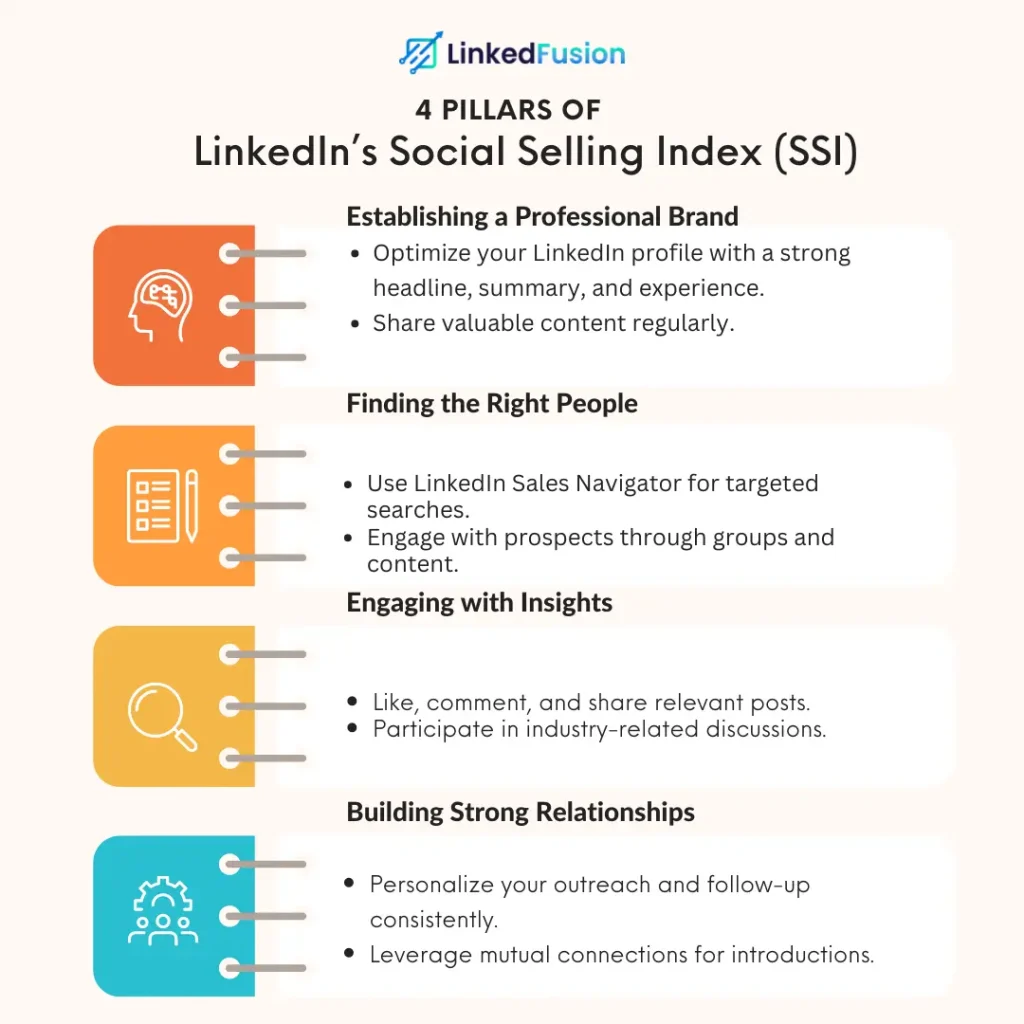
The Social Selling Index (SSI) is LinkedIn’s way of measuring how effective you are at social selling on the platform. Your SSI score is based on four key components:
- Establishing a Professional Brand
- Finding the Right People
- Engaging with Insights
- Building Strong Relationships
Here’s how to use the SSI to boost your social selling efforts:
- Monitor Your Score: Regularly check your SSI score to see where you stand.
- Focus on Weak Areas: If your score is low in a particular area, work on improving it. For example, if your “Finding the Right People” score is low, spend more time prospecting with LinkedIn’s advanced search features.
- Use SSI to Set Goals: Set targets for increasing your SSI score. Higher scores typically correlate with better sales performance.
How to Improve Your SSI Score:
- Establishing a Professional Brand: Optimize your LinkedIn profile and regularly share valuable content.
- Finding the Right People: Use LinkedIn Sales Navigator to identify and connect with potential prospects.
- Engaging with Insights: Engage with content that is relevant to your industry and prospects.
- Building Relationships: Focus on building long-term relationships rather than just closing deals.
Building Relationships Through Social Selling on LinkedIn: Tips to Build Rapport and Trust with Prospects
Social selling isn’t just about making a sale—it’s about building relationships. Here’s how you can use LinkedIn to build rapport and trust with your prospects:
- Personalize Your Outreach: Avoid generic messages. Tailor your connection requests and InMails to each prospect based on their profile, interests, and recent activity.
- Engage with Their Content: Like, comment on, and share your prospect’s posts. This shows that you’re genuinely interested in what they have to say.
- Provide Value First: Before you pitch, offer something of value—whether it’s a helpful article, a free trial, or a solution to a problem they’re facing.
- Be Consistent: Regularly check in with your prospects and engage with their content. Building trust takes time, so be patient and consistent.
Tips for Building Rapport on LinkedIn
| Action | Why It Works |
|---|---|
| Personalizing Outreach | Makes your messages stand out and feel genuine |
| Engaging with Prospect’s Content | Shows interest and helps build a connection |
| Offering Value First | Establishes trust and positions you as a helpful resource |
| Consistent Interaction | Keeps you top-of-mind without being pushy |
Mastering LinkedIn’s Outreach Tools
Using LinkedIn InMail for Sales Outreach: Best Practices for Sending Effective Messages
LinkedIn InMail is a powerful tool for reaching out to prospects who aren’t in your network. To make the most of it, follow these best practices:
- Keep It Short and Sweet: Prospects are busy—get to the point quickly.
- Personalize Your Message: Reference something specific from the prospect’s profile or recent activity.
- Offer Value: Explain what’s in it for them. Why should they respond to you?
- Include a Clear CTA: Don’t leave them guessing—tell them exactly what you want them to do next.
InMail Template Example:
Hi [Prospect’s Name],
I noticed you’re involved in [specific industry/role], and I found your recent post about [specific topic] very insightful. I wanted to connect because I believe [your product/service] could help you [specific benefit]. Would you be open to a quick call to discuss this further?
Best regards, [Your Name]
Connection Requests That Convert: How to Personalize Requests to Increase Acceptance Rates
Connection requests are your first touchpoint with a prospect, so make it count. Here’s how to increase your acceptance rates:
- Mention Mutual Connections: If you share connections, mention them in your request.
- Reference Their Work: Compliment a recent article, post, or project they’ve worked on.
- State Your Intent: Be clear about why you want to connect—whether it’s to learn from them, discuss opportunities, or simply network.
Connection Request Example:
Hi [Prospect’s Name],
I came across your profile through our mutual connection, [Mutual Connection’s Name], and was impressed by your work in [specific field]. I’d love to connect and explore ways we might collaborate or share insights.
Looking forward to connecting, [Your Name]
Taking the Conversation Offline: When and How to Move from LinkedIn to Other Communication Channels
Once you’ve built a rapport on LinkedIn, it’s often beneficial to move the conversation offline:
- Look for Signals: If a prospect is engaging frequently, they might be ready for a call or meeting.
- Suggest a Call or Meeting: Propose a specific time to discuss further—this shows you’re serious.
- Use Email or Phone for Detailed Conversations: Some discussions are better suited for more traditional communication methods.
Best Practices:
- Transition smoothly by suggesting a call at a time convenient for them.
- Offer to send an agenda or topic list for the call, which adds value to the proposition.
- Respect their preferred communication channel and be flexible with scheduling.
Content Strategy for LinkedIn Sales
Creating Content That Drives Engagement: Types of Content That Resonate with Your Target Audience
Content is king on LinkedIn, and the right content can significantly boost your lead generation efforts:
- Educational Posts: Share tips, how-tos, and industry insights.
- Success Stories: Showcase how your product or service has solved problems for others.
- Engaging Visuals: Use infographics, videos, and slideshows to capture attention.
- Interactive Content: Polls and questions can drive engagement and provide insights into your audience’s needs.
Types of Content for LinkedIn Engagement
| Content Type | Why It Resonates |
|---|---|
| Educational Posts | Provides value and establishes authority |
| Success Stories | Demonstrates real-world applications and builds trust |
| Visual Content | Captures attention and is easily digestible |
| Interactive Posts | Engages the audience and encourages participation |
LinkedIn for Sales Lead Generation: How to Use Content to Attract and Nurture Leads
Your content strategy should focus on attracting prospects and nurturing them through the sales funnel:
- Top of Funnel: Create awareness with broad, educational content that addresses common challenges.
- Middle of Funnel: Share case studies, whitepapers, and webinars to provide in-depth insights.
- Bottom of Funnel: Use product demos, free trials, and consultations to convert leads into customers.
Lead Nurturing Tips:
- Use LinkedIn Sponsored Content to target specific audiences with your posts.
- Engage with leads who comment or like your content by following up with a message.
- Regularly post content that moves prospects through each stage of the funnel.
Posting Frequency and Timing: Maximizing Visibility with the Right Schedule
To get the most out of your LinkedIn content, you need to post at the right times and with the right frequency:
- Optimal Posting Times: Mornings (7-9 AM) and evenings (5-6 PM) are typically the best times to post.
- Frequency: Aim for 2-3 posts per week to stay top-of-mind without overwhelming your audience.
- Consistency: Stick to a regular posting schedule to build a reliable presence on the platform.
Pro Tip: Use LinkedIn Analytics to track engagement and adjust your posting schedule based on what works best for your audience.
Integrating LinkedIn into Your Sales Process
Using LinkedIn as Part of a Multichannel Sales Approach: How LinkedIn Fits into a Broader Sales Strategy
LinkedIn shouldn’t be the only tool in your sales toolkit—it works best as part of a multichannel approach:
- Email Campaigns: Use LinkedIn to gather insights and personalize your email outreach.
- Phone Calls: After connecting on LinkedIn, follow up with a call to discuss opportunities in more detail.
- Webinars and Events: Promote your events on LinkedIn to reach a wider audience and attract qualified leads.
Multichannel Sales Strategy
| Channel | How LinkedIn Fits In |
|---|---|
| Personalize campaigns using LinkedIn insights | |
| Phone | Follow up on LinkedIn interactions with a call |
| Events | Promote webinars and events through LinkedIn posts and ads |
LinkedIn for B2B Sales: Strategies Specifically Tailored for B2B Environments
B2B sales on LinkedIn require a strategic approach:
- Account-Based Marketing (ABM): Use LinkedIn to target specific companies and decision-makers.
- Thought Leadership: Position yourself as an industry expert through regular, insightful posts.
- Networking: Build relationships with multiple stakeholders within a target organization.
Strategies for Success:
- Use LinkedIn Sales Navigator to identify key decision-makers within target companies.
- Regularly publish thought leadership content to build credibility and attract B2B leads.
- Join and engage in industry-specific LinkedIn Groups to connect with potential B2B prospects.
CRM and LinkedIn Integration: How to Streamline Your Sales Process by Integrating LinkedIn with Your CRM
Integrating LinkedIn with your CRM can streamline your sales process and improve efficiency:
- Automatic Lead Capturing: Sync leads from LinkedIn directly into your CRM.
- Seamless Follow-Ups: Track LinkedIn interactions and manage follow-ups within your CRM.
- Enhanced Reporting: Combine LinkedIn data with your CRM reports to get a full picture of your sales activities.
Tools for Integration:
- Salesforce: Integrate LinkedIn Sales Navigator with Salesforce to streamline lead management.
- HubSpot: Use HubSpot’s LinkedIn integration to track and nurture leads directly from LinkedIn.
- Zoho CRM: Leverage Zoho’s LinkedIn integration to connect with prospects and automate workflows.
Overcoming Challenges in LinkedIn Sales
Common LinkedIn Sales Challenges: Addressing Low Response Rates and Other Hurdles
Despite its effectiveness, LinkedIn sales comes with its challenges:
- Low Response Rates: Combat this by personalizing your outreach and following up consistently.
- Time Management: Prioritize your LinkedIn activities to ensure you’re focusing on high-value tasks.
- Overcoming Skepticism: Build trust by providing value first and establishing credibility through content.
How to Overcome These Challenges:
- Use A/B testing to refine your messaging and improve response rates.
- Set aside specific times for LinkedIn activities to manage your time effectively.
- Start with small asks (like a connection request) before moving to bigger commitments (like a call).
Handling Objections on LinkedIn: Techniques for Turning Negative Responses into Opportunities
Objections are a natural part of the sales process, even on LinkedIn:
- Acknowledge the Objection: Show that you understand their concerns and appreciate their feedback.
- Provide Additional Information: Offer more details or resources that address their objection.
- Suggest Alternatives: If they’re not ready for a call, suggest a lower-commitment option like a brief Q&A over LinkedIn messages.
Example Response to an Objection:
Hi [Prospect’s Name],
I completely understand your hesitation. A quick chat might feel like a big ask right now. How about I send over some information that could help clarify things? If it looks like a fit, we can take it from there. Either way, I’m here to help!
Best, [Your Name]
Managing Time Effectively on LinkedIn: Balancing LinkedIn Prospecting with Other Sales Activities
LinkedIn can be a time-sink if not managed properly. Here’s how to balance your time:
- Set Daily Goals: For example, send 10 connection requests, engage with 5 posts, and follow up on 3 leads.
- Use Automation Tools: Tools like LinkedIn Sales Navigator can help you automate some tasks, freeing up time for other activities.
- Batch Your Tasks: Dedicate specific time blocks for LinkedIn activities so you can focus without distractions.
Time Management Tips:
- Morning Routine: Spend the first 30 minutes of your day checking LinkedIn and engaging with your network.
- Task Batching: Group similar tasks together (e.g., sending connection requests) to work more efficiently.
- Weekly Review: At the end of the week, review your LinkedIn activity and adjust your strategy as needed.
Conclusion
LinkedIn is a powerhouse for any salesperson looking to elevate their sales game. Whether you’re a seasoned sales rep or new to the scene, using LinkedIn for sales can significantly boost your success rate. From crafting the perfect sales pitch to leveraging LinkedIn Sales Navigator, the platform offers a myriad of tools designed to help you close more deals and generate high-quality leads. The power of LinkedIn lies in its ability to connect you with potential buyers, build your personal brand, and expand your reach across the social network. So, if you’re in sales, it’s time to harness LinkedIn’s full potential and start seeing real results.
Frequently Asked Questions
How can LinkedIn help a salesperson close more deals?
LinkedIn allows sales reps to connect directly with decision-makers, personalize their sales pitch, and use social proof to build trust, making it easier to close more deals.
What are the best ways to use LinkedIn for sales?
Some of the best ways to use LinkedIn for sales include leveraging LinkedIn Sales Navigator, engaging with leads on the platform, and using LinkedIn’s search results to identify potential buyers.
How does LinkedIn help build a personal brand for sales professionals?
LinkedIn allows you to showcase your expertise through posts, articles, and engagement, helping you build a personal brand that resonates with your target audience.
Is investing in LinkedIn Sales Navigator worth it?
Yes, investing in LinkedIn Sales Navigator is highly beneficial for sales reps who want to find high-quality leads, access advanced search filters, and manage their sales pipeline more effectively.
Can LinkedIn be used to generate leads?
Absolutely. LinkedIn is a great platform for generating leads by allowing you to connect with potential buyers, engage with their content, and use the platform’s tools to track and manage leads.
How can a sales rep stay relevant on LinkedIn?
To stay relevant, sales reps should regularly post valuable content, comment on their prospect’s posts, and continuously engage with their network to maintain a strong presence on the platform.
What is the role of social proof on LinkedIn?
Social proof on LinkedIn, such as endorsements and recommendations, helps build credibility and trust with potential buyers, significantly increasing your chances of generating leads and closing deals.