

LinkedIn has become one of the most powerful platforms for B2B lead generation, prospecting, recruitment, and relationship building. However, as outreach campaigns scale, managing conversations manually becomes increasingly difficult. Sales teams often find themselves juggling multiple campaigns, hundreds of prospects, and countless LinkedIn messages spread across different conversations.
When important messages get buried, follow-ups are delayed, and opportunities are missed. This is where the LinkedFusion Inbox becomes essential.
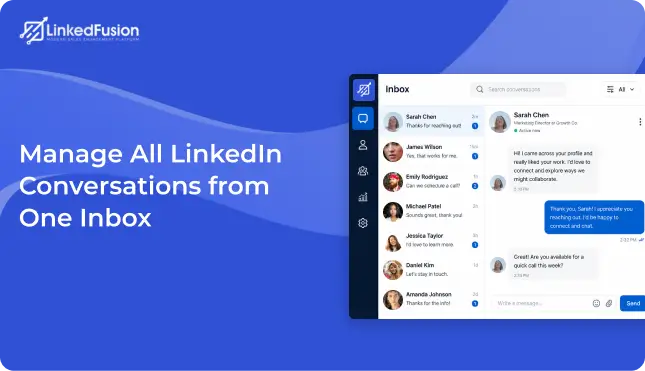
The LinkedFusion Inbox is designed to serve as a centralized communication hub for all your LinkedIn outreach activities. Instead of switching between LinkedIn tabs, campaigns, and prospect lists, users can access every conversation from a single dashboard. Whether you’re handling a few dozen leads or thousands of prospects, the Inbox helps you stay organized, respond faster, and build stronger relationships.
What is the LinkedFusion Inbox?
LinkedFusion Inbox is a centralized LinkedIn conversation management feature that allows users to view, organize, search, filter, and respond to prospect messages from a single dashboard. It helps sales teams, recruiters, agencies, and business development professionals manage LinkedIn conversations efficiently, improve response times, and streamline outreach workflows.
It provides a structured environment where users can:
- View all prospect conversations
- Monitor incoming replies
- Filter conversations by campaign
- Organize prospects using tags
- Search message history
- Track communication timelines
- Manage outreach engagement efficiently
Instead of treating conversations as isolated interactions, the Inbox transforms them into an organized workflow that supports your entire sales process.
Why Businesses Need a Centralized Inbox
As outreach volume grows, so does the complexity of communication management.
Many businesses struggle with:
- Missed prospect replies
- Slow follow-ups
- Disorganized conversations
- Lack of visibility across campaigns
- Difficulty finding past interactions
- Poor lead prioritization
A centralized inbox eliminates these challenges by bringing every interaction into a single workspace where conversations can be tracked, organized, and managed effectively.
Key Features of the LinkedFusion Inbox
1. Centralized Conversation Management
The primary goal of the Inbox is to provide a unified view of all prospect interactions.
Instead of opening multiple LinkedIn windows or manually checking different campaigns, users can monitor every conversation from one dashboard.
Benefits
- Simplifies conversation tracking
- Improves team productivity
- Reduces context switching
- Keeps communication organized
- Creates a better user experience
For sales professionals handling hundreds of prospects daily, this centralization significantly improves efficiency.
2. Unread Message Tracking
One of the most valuable features available in the Inbox is the ability to identify unread messages instantly.
The “Show Unread” option helps users focus on conversations that require immediate attention.
Why This Matters
Response speed plays a critical role in conversion rates.
Prospects who receive quick responses are more likely to:
- Continue the conversation
- Schedule meetings
- Request demos
- Move further down the sales funnel
Benefits
- Never miss important replies
- Prioritize active prospects
- Improve response times
- Increase engagement opportunities
3. Powerful Search Functionality
As conversation volume increases, finding specific prospects manually becomes difficult.
The built-in search feature allows users to locate conversations quickly.
Search Conversations By
- Prospect Name
- Company Name
- Message Content
- Contact Information
- Conversation History
Benefits
- Save time
- Access conversations instantly
- Improve workflow efficiency
- Reduce manual searching
This feature becomes particularly useful for agencies and sales teams managing large prospect databases.
4. Sequence-Based Filtering
LinkedFusion allows users to run multiple outreach sequences simultaneously.
The “All Sequences” filter helps users isolate conversations generated from specific campaigns.
Example
A company might run separate campaigns targeting:
- SaaS Founders
- Marketing Managers
- Recruiters
- CEOs
- Agencies
Instead of reviewing all conversations together, users can focus on interactions generated by a particular sequence.
Benefits
- Campaign-specific analysis
- Better performance tracking
- Improved campaign management
- Easier lead segmentation
5. Tag-Based Conversation Organization
Not all prospects are equal.
Some may be highly interested, while others require nurturing.
The tag system helps users categorize and organize conversations efficiently.
Common Tags
- Hot Lead
- Warm Lead
- Follow-Up Needed
- Demo Booked
- Qualified Prospect
- Decision Maker
- Enterprise Account
- Recruiting Candidate
Benefits
- Better lead management
- Faster segmentation
- Personalized outreach
- More organized sales pipelines
Tags make it easier to prioritize prospects and tailor communication strategies.
6. Message Category Filtering
The Inbox includes message-type filtering options that allow users to focus on specific categories of conversations.
Potential Uses
- View all conversations
- Focus only on replies
- Monitor follow-up interactions
- Analyze response trends
- Track campaign engagement
Benefits
- Cleaner inbox management
- Faster prospect identification
- Better communication tracking
This ensures users spend less time sorting conversations and more time engaging prospects.
7. Conversation Status Management
Managing conversations effectively requires understanding where each prospect stands in the engagement process.
Status-based filtering helps users organize prospects according to their current stage.
Examples
- New Conversations
- Active Conversations
- Follow-Up Required
- Qualified Leads
- Inactive Prospects
Benefits
- Improved pipeline visibility
- Better lead prioritization
- Faster qualification
- More efficient workflow management
This feature enables teams to focus their efforts on prospects most likely to convert.
8. Date Range Filtering
The Inbox includes Start Date and End Date filters that allow users to analyze conversations within specific time periods.
Common Use Cases
- Weekly reporting
- Monthly campaign reviews
- Quarterly performance analysis
- Lead generation tracking
Benefits
- Historical conversation analysis
- Better campaign reporting
- Trend identification
- Performance measurement
Users can quickly review outreach activity across custom date ranges.
9. Split-Screen Conversation Interface
The Inbox uses a professional split-screen design to improve usability.
Left Panel
Displays:
- Prospect list
- Contact information
- Conversation previews
Right Panel
Displays:
- Complete conversation history
- Message threads
- Communication timeline
Benefits
- Easy navigation
- Better conversation context
- Faster prospect switching
- Improved productivity
Users can move between conversations without losing track of important details.
10. Real-Time Conversation Access
Sales opportunities often depend on timing.
The Inbox enables users to access conversations instantly and continue discussions without delays.
Benefits
- Faster responses
- Better engagement
- Improved lead nurturing
- Increased meeting bookings
Real-time access ensures opportunities don’t sit unattended.
11. LinkedIn Account Connectivity
The Inbox integrates directly with LinkedIn outreach activities.
Users can connect their LinkedIn accounts and manage conversations within the LinkedFusion platform.
Benefits
- Centralized communication management
- Consistent outreach tracking
- Better workflow efficiency
- Unified prospect engagement
This integration creates a seamless connection between prospecting and communication.
12. Notification System
Staying informed about prospect activity is critical.
The notification center alerts users when important actions occur.
Notifications May Include
- New replies
- Prospect engagement
- Message updates
- Campaign-related activity
Benefits
- Faster reaction times
- Better prospect experience
- Improved engagement management
- Reduced missed opportunities
How the LinkedFusion Inbox Supports the Sales Process
The Inbox supports every stage of the outreach journey.
Prospect Engagement
Track conversations and maintain communication consistency.
Lead Qualification
Identify interested prospects through active engagement.
Relationship Building
Develop stronger relationships through organized communication.
Opportunity Management
Ensure important conversations receive timely attention.
Conversion Optimization
Improve response rates and increase pipeline opportunities.
Benefits for Different Teams
Sales Teams
- Faster follow-ups
- Better lead management
- Higher productivity
Recruitment Teams
- Centralized candidate communication
- Easier applicant tracking
- Faster engagement
Agencies
- Manage multiple client campaigns
- Organize prospect communications
- Scale outreach efficiently
Business Development Teams
- Identify opportunities faster
- Maintain prospect relationships
- Improve pipeline visibility
Why the LinkedFusion Inbox Matters
Successful outreach is not just about sending connection requests and messages. It is about managing conversations effectively after prospects engage.
Without a centralized inbox, businesses often face communication bottlenecks, delayed responses, and missed opportunities.
The LinkedFusion Inbox solves these challenges by providing a structured environment where every conversation can be tracked, organized, searched, filtered, and managed from a single dashboard.
Whether you’re running one campaign or dozens, the Inbox helps you stay organized, engage prospects faster, and turn more conversations into business opportunities.
Conclusion
The LinkedFusion Inbox is more than just a messaging dashboard. It is a complete conversation management solution designed for modern sales, recruiting, and business development teams.
With advanced filtering, search functionality, unread message tracking, sequence organization, tagging capabilities, date-based reporting, and centralized communication management, the Inbox helps businesses streamline LinkedIn engagement and maximize outreach results.
By keeping every conversation accessible and organized, LinkedFusion empowers teams to respond faster, nurture relationships effectively, and generate more revenue from their LinkedIn outreach efforts.
FAQs
A LinkedIn inbox management tool helps users organize, track, and respond to LinkedIn conversations from a centralized dashboard. It improves communication management and outreach efficiency.
Yes. LinkedFusion Inbox allows users to manage all outreach-generated LinkedIn conversations from a single dashboard, making it easier to monitor and respond to prospects.
LinkedFusion Inbox provides tags, filters, search functionality, sequence filters, and date-based filtering to help users organize conversations effectively.
Faster responses improve engagement rates, increase trust, and create more opportunities for meetings, demos, and sales conversations.
Using a centralized inbox like LinkedFusion Inbox allows teams to identify unread messages quickly, prioritize active conversations, and manage follow-ups efficiently.
LinkedFusion Inbox is a centralized conversation management feature that helps users manage LinkedIn outreach conversations from one dashboard.
Yes. LinkedFusion Inbox consolidates all outreach-related conversations into a single interface for easier management.
Yes. Users can search conversations using prospect names, companies, or message-related information.
Yes. The Sequence Filter allows users to view conversations associated with specific outreach campaigns.
Tags help categorize prospects into groups such as hot leads, qualified prospects, decision-makers, or follow-up required contacts.
Yes. The Show Unread feature helps users identify conversations that require immediate attention.
Yes. Users can filter conversations using custom start and end dates for reporting and analysis purposes.
Absolutely. Recruiters can manage candidate conversations, organize outreach efforts, and track responses more efficiently.
Yes. Agencies managing multiple client campaigns can organize conversations, track engagement, and streamline prospect communication from one dashboard.
By centralizing conversations, reducing manual searching, and enabling faster responses, LinkedFusion Inbox helps sales teams spend more time engaging prospects and less time managing communication.