

What Is LinkedIn X-Ray Search and How to Use It For Better Results?

Ways to Use LinkedIn X-Ray Search

Looking to hire top talent or connect with high-potential prospects?
Whether you’re a recruiter aiming to build a standout team or a sales professional searching for ideal leads, there’s a smart tool that can give you an edge: LinkedIn X-Ray Search.

This technique helps you go beyond LinkedIn’s built-in search functions. Instead of relying solely on what LinkedIn shows you, X-Ray Search lets you use search engines like Google to find public LinkedIn profiles—and even ones that are hard to spot with standard searches. It’s especially helpful when you’re targeting candidates or prospects with very specific skills or backgrounds.

So how does it work? X-Ray Search uses advanced search strategies like Boolean logic (AND, OR, NOT), quotation marks, and parentheses to control what you see in your results. You can fine-tune your queries to either broaden or narrow your search, depending on what you’re looking for.

In today’s competitive market, tools like this can make a big difference. Whether you’re filling roles or closing deals, mastering X-Ray Search can help you connect with the right people—faster and more effectively.

If you’re wondering how to do an X-Ray Search on LinkedIn or what an X-Ray Search on LinkedIn is, this guide will walk you through everything you need to know. Whether you’re a recruiter looking for the perfect candidate or a sales professional searching for prospects, mastering Google X-Ray Search for LinkedIn can significantly enhance your results.

What Is a LinkedIn X-Ray Search?

With LinkedIn X-ray searches, you may focus on a smaller pool of prospects. Using X-ray search to find leads on LinkedIn is called LinkedIn X-ray search.

LinkedIn X-ray search makes use of a complex methodology to offer far more thorough and precise search results. In order for LinkedIn X-ray to function, a mix of keywords and boolean operators must be used.

Consequently, a keyword might be anything, from job titles to locations and employment histories. Boolean operators, on the other hand, are conjunctions that are used to combine, exclude, or include search results. Boolean operators include quotation OR, AND, and parenthesis() as some examples.

Why Should You Use X-Ray Results on Google for Searching Profiles on LinkedIn?

1. Bypass LinkedIn’s Limitations

Using Google X-Ray Search LinkedIn, you can bypass LinkedIn’s restrictions on viewing profiles. For instance:

  • Free LinkedIn accounts can only view up to 100 profiles.
  • Sales Navigator and Recruiter Lite accounts are limited to approximately 2,500 search results.
  • Premium Business accounts allow access to 1,000 profiles.

With LinkedIn X-Ray Search Google, you can view over 1,000 profiles without these limitations.

2. Access Hidden Profiles

If you’re using LinkedIn for free, you won’t see third-degree connections or profiles outside your network. However, Google X-Ray Search for LinkedIn reveals these hidden profiles, including names and surnames that LinkedIn might obscure.

3. More Comprehensive Results

LinkedIn’s internal search often prioritizes profiles with 100% completion or those within your network. In contrast, Google X-Ray Search LinkedIn provides a broader variety of results, helping you find candidates who might otherwise be overlooked.

How to Use X-ray Search on LinkedIn?

Using these search operators for advanced search results is simple and effective. Following are the ways to use the LinkedIn X-Ray Search Google:

  1. Start by Conducting a Thorough Search
    You must begin with a thorough search if you want to harness the full potential of Google X-ray search and LinkedIn X-ray search. To uncover a diverse pool of possible candidates, entails utilizing numerous search engines and job boards. Using a list of probable candidates as a starting point, utilize X-Ray Search to focus your search.
  2. Use Advance Boolean Operators
    Special commands known as advanced search operators let you focus your search and get more precise results. Let’s understand this with examples of how to do a LinkedIn X-Ray Search:
    • “site” operator: This allows you to search for candidates on a specific website. Example: site:linkedIn.com or site:twitter.com.
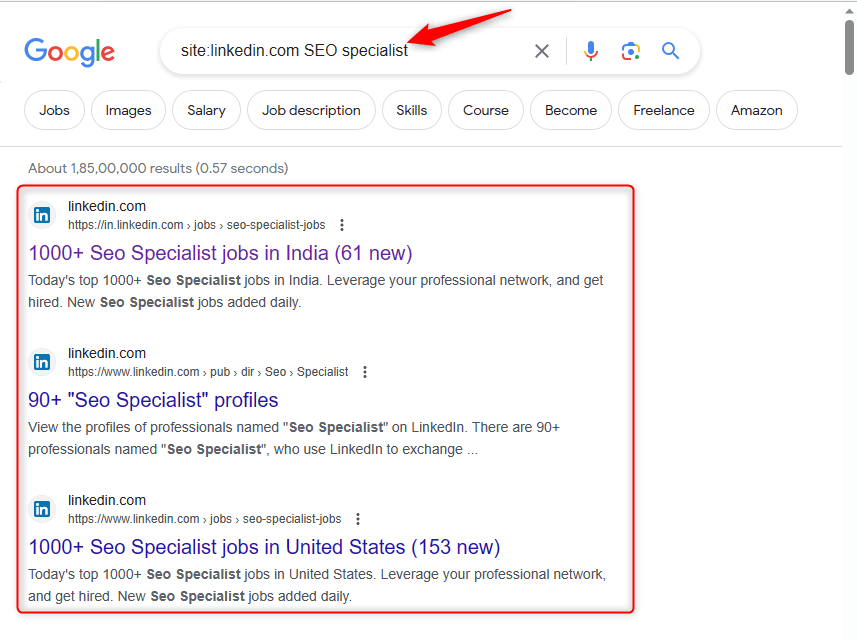
      site operator
    • “intitle” operator: You can use this to search for the keywords in the title of your LinkedIn search for keywords in the title of your LinkedIn profile or Twitter bio. Example: intitle:marketing manager.
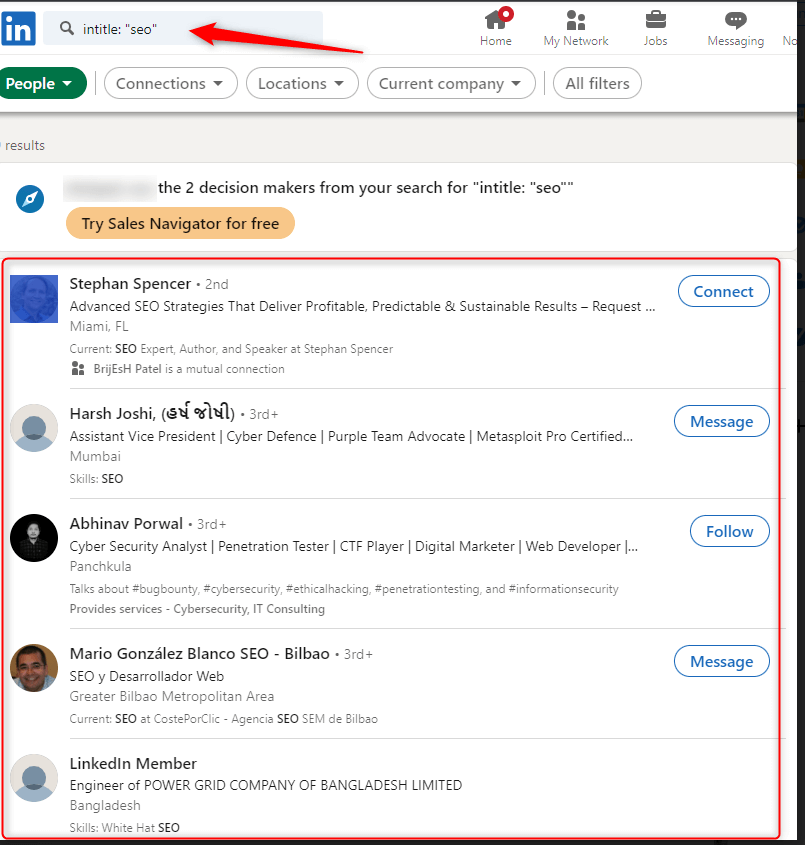
      intitle-operator
    • “Inurl” operator: You can search for the keyword using the URL of the LinkedIn profile or Twitter handle. Example: inurl:linkedIn
    • “filetype” operators:You can search for the specific file types, such as resumes in PDF formula. Example: filetype:pdf.
  3. If You Want to Further Refine Your Search
    When we use words or symbols that allow us to create more complex searches. When you can combine and exclude certain keywords are called Boolean Operators. AND, NOT, OR are Boolean operators that are used to further refine your search. Example:
    • If you want to search for a sales representative with experience in Android D then your search can be like: “SEO Manager” AND Android D”.

Significance of Using X-Ray on LinkedIn

Using LinkedIn’s X-Ray search can increase your visibility. Additionally, it saves you time and gives you access to a list of prospects who are relevant to you. You can utilize the Boolean search operators with your search strings in the LinkedIn X-Ray search.

Recruiters can uncover top marketers by using the LinkedIn X-Ray search feature. It also does an advanced search with the names of particular companies and job titles. The concept of LinkedIn X-ray is based on the notion of gaining more information from your search results. You can use this search technique to make your search more sophisticated and precise. In other words, as compared to other stranded results, this type of search can produce better results. You must use Boolean search, quotation marks, site-specific search, and brackets when performing an X-ray search.

Benefits of Using LinkedIn X-ray Search

  • 1) Large upscaling for searching profile.
  • 2) You can make your search queries more specific.
  • 3) Gives you accurate results that saves you a lot of time.
  • 4) You can get the access in and out search results
  • 5) You have the control over the variable.

The platform already provides a lot of filters that you can use to search for the people to recruit. But, LinkedIn does not allows you to view unlimited number of profiles for free there are restriction:

The following are the limitations:

  • Free LinkedIn account – 100 profiles.
  • If you have subscribed for the sales navigator and Recruiter Lite – approx 2500 search results.
  • Premium Businesses- 1000 profiles.
  • If you perform an X-ray search on google then you can view over 1,000 searches. In this way you can view 1,000 profiles with the use of X-ray search on LinkedIn.

Conclusion :

Mastering LinkedIn X-Ray Search is a game-changer for recruiters and sales professionals. By using Google X-Ray Search for LinkedIn, you can bypass limitations, access hidden profiles, and find the perfect candidates or prospects. Whether you’re learning how to do a LinkedIn X-Ray Search or exploring LinkedIn automation tools, this method will elevate your talent sourcing strategy.

Ready to take your LinkedIn outreach to the next level? Optimize your LinkedIn profile for free with tools like the LinkedIn Profile Checker and start connecting with your ideal candidates today!