
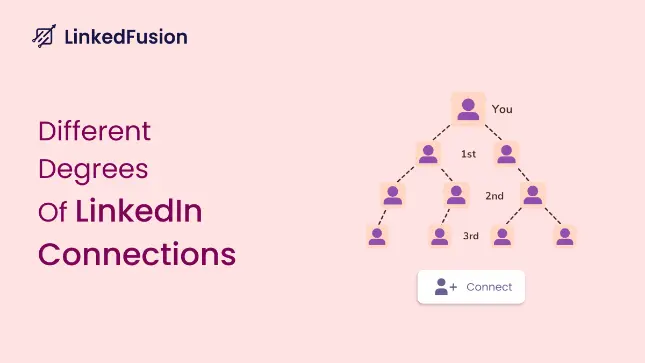

LinkedIn is the go-to platform for professional networking, and understanding the meaning of 1st, 2nd, and 3rd connections is crucial for making the most of your LinkedIn experience. These connection levels define how closely you are connected to other LinkedIn users and determine how you can interact with them. Additionally, leveraging tools like a LinkedIn outreach automation tool can help you streamline your networking efforts and expand your professional connections efficiently.
What Does 1st Mean on LinkedIn?
Your 1st-degree connections are the people you are directly connected to on LinkedIn. This means either you have sent them a connection request that they accepted, or they sent you a request that you accepted.
- How to Identify 1st-Degree Connections: You’ll see a “1st” icon next to their name in search results or on their profile.
- Interaction Options: You can send them direct messages and access their contact details (if shared), such as email addresses or phone numbers.
- Pro Tip: LinkedIn allows up to 30,000 1st-degree connections per account, so prioritize connecting with people who align with your professional goals.
What Does 2nd Mean on LinkedIn?
Your 2nd-degree connections are people who are connected to your 1st-degree connections. While you are not directly connected to them, you share a mutual connection.
- How to Identify 2nd-Degree Connections: A “2nd” icon appears next to their name, and LinkedIn displays your mutual connections on their profile.
- Interaction Options: You can send them a connection request or use LinkedIn’s InMail feature (available with premium accounts) to message them directly.
- Pro Tip: Before sending a connection request, engage with their content by liking or commenting on their posts to increase the chances of acceptance.
What Does 3rd Mean on LinkedIn?
Your 3rd-degree connections are individuals connected to your 2nd-degree connections. These are people further removed from your immediate network.
- How to Identify 3rd-Degree Connections: A “3rd” icon appears next to their name. However, LinkedIn may limit the visibility of their profiles depending on your account type.
- Interaction Options: You can send them a connection request, but the “Connect” button might be hidden under the “More” dropdown menu. Alternatively, you can use InMail to reach out.
- Pro Tip: If you share a LinkedIn group with a 3rd-degree connection, you can message them directly without sending a connection request.
What Does "Out of Network" Mean on LinkedIn?
LinkedIn members who fall outside your 1st, 2nd, and 3rd-degree connections are considered “Out of Network.” These profiles are often restricted, and you may not be able to view their full details or interact with them unless you upgrade to a premium account.
Why Understanding LinkedIn Connections Matters
Knowing the difference between 1st, 2nd, and 3rd connections can help you:
- Expand Your Network: Strategically connect with 2nd and 3rd-degree connections to grow your professional circle.
- Improve Lead Generation: Use LinkedIn’s connection hierarchy to identify and reach potential clients or collaborators.
- Enhance Job Opportunities: Recruiters often look for candidates within their 2nd-degree network, so expanding your connections can increase visibility.
However, you cannot access their contact information or personal details because they are not your initial point of contact.
How to Grow Your LinkedIn Network
Here are some actionable tips to expand your LinkedIn connections:
- Optimize Your Profile: A well-crafted LinkedIn profile increases your chances of connection requests being accepted. Learn how to optimize your LinkedIn profile here.
- Engage with Content: Like, comment, and share posts from your target connections to build rapport.
- Use LinkedIn Groups: Join groups relevant to your industry to connect with like-minded professionals. Check out how LinkedIn is important for B2B professionals.
- Leverage LinkedIn Sales Navigator: This premium tool helps you find and connect with prospects more efficiently. Learn how to export leads from LinkedIn Sales Navigator.
- Automate Outreach: Use LinkedIn automation tools like LinkedFusion to streamline your connection requests and follow-ups. Discover LinkedIn outreach automation tools.
Conclusion :
Understanding the meaning of 1st, 2nd, and 3rd connections on LinkedIn is crucial for building a strong professional network. By strategically connecting with others and leveraging LinkedIn’s features, you can unlock new opportunities for career growth, lead generation, and collaboration. Start expanding your network today and make the most of LinkedIn’s potential!