

In today’s hyper-competitive B2B sales environment, personalization and insight-driven engagement aren’t optional; they’re essential. But here’s the problem: 88% of B2B buyers say the content they receive from sellers is not relevant to their needs.
If you’re relying solely on static PDFs or attachments via email or LinkedIn messages, you’re not just behind; you’re invisible.
Enter LinkedIn Smart Links: a powerful feature within LinkedIn Sales Navigator that helps you package, track, and optimize your outreach efforts with laser precision.
In this blog, we’ll explore what smart links are, how they enhance LinkedIn campaigns, how to create and use them, and how tools like LinkedFusion help amplify engagement and follow-up.
What Are Smart Links on LinkedIn?
A Smart Link is a simplest way to package and share content such as decks, PDFs, landing pages, or videos with prospects via a unique, trackable link. This feature is available in Sales Navigator Advanced and Advanced Plus subscriptions.
When your prospects and customers click the smart link, you get detailed analytics about their viewing behavior, what they clicked, how long they viewed it, and whether they came back.
It’s a smarter way to share content that enables sellers to get real-time insights on what’s resonating and follow up accordingly.
Instead of asking for an email address to access a resource, smart links track clicks and engagement automatically without creating friction.
Why Sales Navigator Smart Links Matter for Engagement in Outreach Campaigns?
In modern sales, it’s no longer enough to send content; you need to know how your prospects engage with it. That’s where LinkedIn Smart Links come in. Integrated within Sales Navigator, smart links aren’t just tools for sharing files; they’re engagement engines that help you understand and act on buyer behavior.
When you send a smart link as part of your LinkedIn outreach, you’re doing more than delivering content. You’re enabling a two-way interaction that offers deep insights into how the prospect responds.
Here’s how Sales Navigator Smart Links drive real engagement:
- Real-Time Click Tracking: Know exactly when your prospect clicks the link, how long they spend on the content, and what sections they revisit.
- Engagement Signals: If a buyer views your smart link multiple times or shares it internally, it signals intent by prompting timely and personalized follow-ups.
- Content Intelligence: Smart links show you which landing pages, decks, or videos are actually being consumed, helping you optimize your messaging for future campaigns.
- Smarter Follow-ups: Rather than guessing, you can tailor follow-up messages based on actual engagement behavior, turning cold outreach into warm, relevant conversations.
- Campaign Optimization: With analytics from smart links, you can identify which content pieces drive the most engagement, refine your messaging, and scale winning strategies.
In short, smart links transform passive outreach into active conversation starters. They give you visibility into your prospect’s interests, turning each click into a powerful engagement trigger. For any B2B team looking to improve LinkedIn outreach results, smart links aren’t optional—they’re essential.
By combining Sales Navigator smart links with smart timing and context, you ensure your messages don’t just reach inboxes—they resonate and convert.
How to Make a LinkedIn Smart Link?
Here’s a quick step-by-step guide using Sales Navigator Advanced:
1. Log in to Sales Navigator
Requires Advanced or Advanced Plus account.
2. Navigate to the Smart Links tab in the top navigation bar.
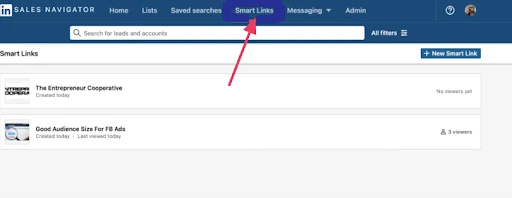
3. Click “Create Smart Link.”
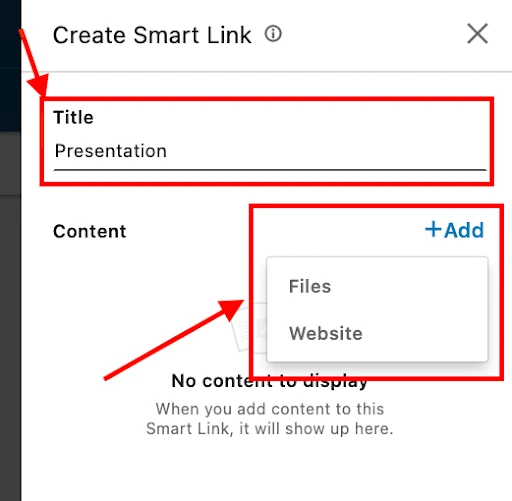
4. Upload your content – This could be a PDF, video, presentation deck, or external URLs like case studies or product pages.
5. Name your smart link (for internal reference).
6. Share it directly via LinkedIn messages, InMail, or include it in your LinkedIn outreach messages or email outreach.
You can even track which prospect clicked it, what they viewed, and follow up with relevant messaging.
How Are Smart Links Different from Sending Content via Email?
Here’s a side-by-side comparison of using smart links vs. traditional email attachments:
| Feature | Smart Links | Email Attachments |
|---|---|---|
|
Track Clicks & Views |
Yes |
No |
|
Know Who Viewed It |
Yes (via LinkedIn login or metadata) |
No |
|
Preview & Redirect |
Built-in |
Static |
|
Better Privacy Settings |
Controlled |
Exposed |
|
Integrated Analytics |
Real-time |
None |
When you send content via email, you lose visibility once it’s sent. With smart links, you gain trackable insights that help you adjust your messaging and improve your value proposition in follow-ups.
Are LinkedIn Smart Links Safe?
Yes, LinkedIn smart links are safe, provided they’re used correctly and ethically. Since they’re hosted within the LinkedIn Sales Navigator ecosystem, they maintain the same privacy settings and trust parameters.
However, just like any unique link, users should be cautious of phishing attempts disguised as smart links.
To ensure legitimacy:
- Always preview smart links before clicking
- Look for the official LinkedIn domain (e.g., smartlinks.linkedin.com)
- Avoid clicking smart links from unknown senders
From the sales professional’s side, smart links offer a secure, easy way to package and share content without forcing a login or asking for emails.
Smart Links Use Cases for LinkedIn Campaigns
Let’s look at some common smart links use cases that enhance LinkedIn outreach:
1. Personalized Sales Outreach
Share a trackable link to your pitch deck via LinkedIn messages or InMail, and monitor how your prospect engages.
2. Follow-up After Events
After a webinar or conference, use a smart link to package and share content (like slides, offers, or ebooks) with leads.
3. ABM (Account-Based Marketing) Campaigns
Send custom content to target accounts and track clicks and viewing behavior to identify warm leads.
4. Nurture Sequences
Embed smart links into email outreach or LinkedIn sequences to measure which content performs best across your funnel.
5. Team Collaboration
Sales teams can use smart links to standardize content and gain shared analytics on what’s working.
Each viewed smart link becomes a micro-conversion you can build upon.
Track Prospect Insights Using LinkedIn Sales Navigator Smart Links
Every time someone views your smart link, it’s a chance to learn.
With LinkedIn’s in-built analytics dashboard, you can:
- See total and unique clicks
- Identify high-intent prospects
- Evaluate which content triggered deeper engagement
- View heatmaps to know which part of a deck was most popular
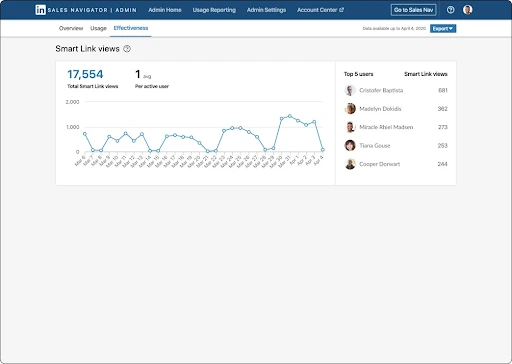
This lets you track viewing behavior and score leads based on actual interest, not just assumptions.
It’s no longer about sending content; it’s about sending trackable content that informs your next move.
Reddit users say LinkedIn Smart Links can sometimes lag or miss data, so they recommend cross-verifying with other analytics tools to ensure accurate tracking.
Posts from the digitalmarketing
community on Reddit
Enhance Campaign Results with Analytics and Follow-ups
Want to know which LinkedIn campaign is truly working?
Smart links provide real-time insight into which messages and content are hitting the mark. Whether you’re doing LinkedIn outreach manually or via LinkedIn automation, smart links give your campaigns a feedback loop.
Combine that with automated follow-up sequences based on viewing behavior, and you’ll build a lead generation engine that converts.
Reddit users say to avoid burying LinkedIn Smart Links, place them early in the post or in the first comment to boost visibility and click-throughs.
Use LinkedFusion to Boost Smart Link Engagement
While LinkedIn Sales Navigator gives you smart links, it doesn’t manage the outreach lifecycle.
That’s where LinkedFusion comes in.
LinkedFusion is a LinkedIn automation tool designed to run scalable LinkedIn campaigns that incorporate smart links, connection requests, and follow-ups—all in one dashboard.
Here’s how it enhances your smart link strategy:
- Automated Outreach: Send personalized messages with smart links at scale
- Campaign Sequencing: Use triggers based on smart link engagement to auto-send next steps
- CRM Integration: Sync viewing data with your CRM to create smart follow-up actions
- Inbox Management: Centralize smart link conversations across multiple accounts
Example: If a prospect clicks on your smart link but doesn’t respond within 3 days, LinkedFusion can automatically trigger a follow-up with more value-driven messaging.
By combining LinkedIn smart links and LinkedFusion’s automation, you create a sales machine that is personal, data-driven, and scalable.
Final Thoughts: Smart Links Are the Future of LinkedIn Prospecting
As more sales professionals embrace digital-first selling, the importance of trackable, insight-rich outreach is skyrocketing. Smart links on LinkedIn represent the next evolution of content sharing—offering clarity, control, and context to every sales interaction.
Instead of guessing who’s interested, now you know—and that changes everything.
So if you’re using LinkedIn Sales Navigator, don’t let this feature go untapped. Leverage smart links in your LinkedIn outreach, analyze the engagement, and scale it further with tools like LinkedFusion.
Start sending smarter content today—and let your prospects show you the way forward.