

Inbox chaos can kill your productivity, especially if you’re in sales or outreach. Imagine juggling dozens of LinkedIn conversations, follow-ups, connection requests, and CRM updates, all while ensuring no prospect falls through the cracks.
For growing teams and busy professionals, managing LinkedIn outreach without automation feels like herding cats.
Reddit users vent that Gmail’s bulk management is clunky and spend threads debating which third-party apps truly simplify search, rules, and subscription cleanup.
Personal Email Management Tools?
byu/617dj28 inproductivity
That’s why mastering inbox management using a robust LinkedIn automation tool like LinkedFusion is no longer optional; it’s essential.
Let’s dive deep into why LinkedFusion is redefining inbox workflows, how it compares with other LinkedIn automation platforms, and how you can automate, integrate, and scale your lead generation like a pro.
Why Smart Inbox Management Matters for LinkedIn Outreach?
If you’re doing manual LinkedIn outreach, you’re likely facing:
- Missed replies and forgotten follow-ups
- Switching between tabs for LinkedIn, CRM, and email
- Struggling to prioritize leads based on replies or profile activity
- Wasting time on low-intent prospects
Poor inbox management leads to lost leads, broken outreach sequences, and frustrated sales teams.
But what if you could unify all your messages from multiple LinkedIn accounts in one view? Track replies, automate follow-ups, and even sync with your CRM?
That’s where LinkedFusion enters the game.
Reddit users are intrigued by AI-powered inbox managers as a potential cure for email overload, though many remain skeptical about privacy and real-world accuracy.
Built a solution to email overload: An AI assistant that actually manages your inbox [Creator Post]
byu/email-expert inProductivityApps
What is Inbox Management in LinkedFusion?
Inbox management in LinkedFusion refers to the structured process of organizing, prioritizing, and responding to all your LinkedIn conversations at scale, across multiple accounts, and with total visibility.
Unlike the default LinkedIn inbox, which offers limited features and only supports one profile at a time, LinkedFusion’s unified inbox is purpose-built for high-volume LinkedIn outreach, agencies, and B2B sales teams.
Here’s how it transforms the way you manage your inbox:
View and Reply to All Messages Across Multiple LinkedIn Profiles
Whether you’re running lead generation campaigns from multiple LinkedIn accounts or managing inboxes on behalf of clients, LinkedFusion consolidates all your conversations into one single interface. This eliminates the need to switch between accounts or browsers and ensures that no prospect message goes unnoticed.
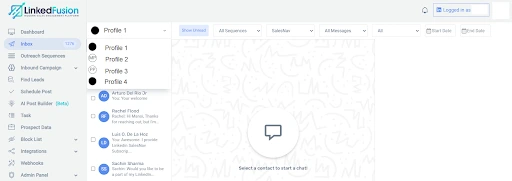
Prioritize Conversations with Hot Prospects
Not all leads are equal. LinkedFusion helps you prioritize chats with high-intent prospects by tagging and scoring them based on their behavior, such as message replies, profile visits, or content engagement. This lets you focus your energy on leads most likely to convert.
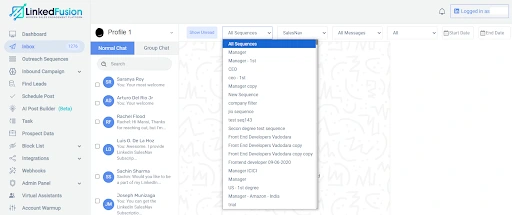
Automate Message Sequences
Save time and scale communication using automated follow-up sequences that continue the conversation even when you’re offline. Whether it’s a new connection message, a delayed pitch, or a gentle reminder, LinkedFusion ensures the right message reaches the right prospect at the right time.
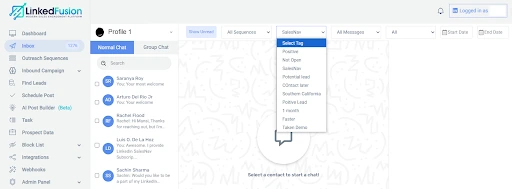
Use Tags to Filter Messages in the Inbox
Apply smart tags like “Interested”, “Follow-up Later”, or “Client XYZ” to quickly filter and manage ongoing conversations. This is especially needed for agencies or individuals managing outreach for multiple clients who need structured inbox visibility.
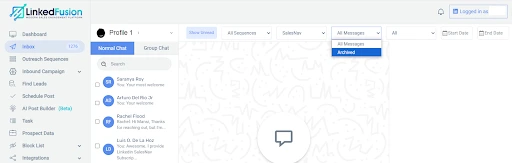
Archive or Suppress Unimportant Messages
Got cold leads or unresponsive contacts? Simply archive these threads to keep your inbox clutter-free or add them to the suppression list to ensure they don’t receive future messages in any automated campaign. This ensures you’re targeting only active, relevant audiences.
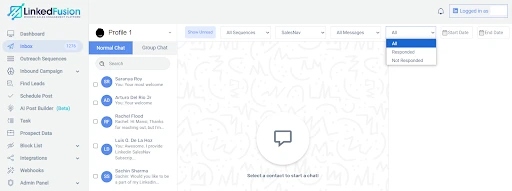
Identify and Reply to Unanswered Messages
LinkedFusion flags messages that haven’t received a response from your end, helping you maintain a responsive and professional presence. This functionality ensures your outreach efforts are consistent and no LinkedIn connections are left hanging.
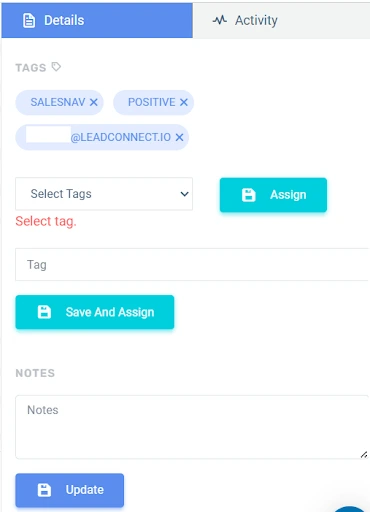
Assign Chats to Different Team Members
Working as a team? LinkedFusion lets you assign conversations to specific users, so every chat is handled by the right person. Whether you’re a sales manager delegating accounts or an agency distributing client leads, this feature brings true collaboration to your LinkedIn automation platform.
In essence, LinkedFusion’s unified inbox is not just a place to respond to messages, it’s a sales engagement platform that organizes your entire communication workflow. From message tracking to CRM sync, LinkedFusion supports a scalable and streamlined approach to LinkedIn outreach and lead generation.
LinkedFusion: The Cloud-Based LinkedIn Automation Tool Designed for Scale
LinkedFusion is a cloud-based LinkedIn automation tool that helps users automate their LinkedIn outreach and streamline lead generation.
It’s especially useful for:
- B2B marketers and sales reps doing high-volume lead generation
- Agencies managing multiple LinkedIn accounts
- Recruiters needing a structured way to track candidate conversations
With advanced inbox management features, you can finally take control of your LinkedIn messages.
LinkedFusion offers multi-account management, a unified inbox, CRM sync, and full automation sequences, making it one of the most trusted LinkedIn automation platforms available.
Integration Made Easy: LinkedFusion + CRM + Email
One of the strongest features of LinkedFusion is its smooth CRM integration with platforms like HubSpot, Pipedrive, and Salesforce.
Here’s how it helps:
- Every conversation syncs automatically with your CRM
- Manage leads from LinkedIn that are auto-tagged based on behavior
- You can launch email + LinkedIn outreach campaigns together
- No follow-up is ever missed
This multi-channel approach (LinkedIn and email) boosts response rates and creates a better prospect experience.
LinkedFusion supports easy setup and lets you manage all of this from one clean dashboard.
Personalization at Scale: Inbox Automation for Every Prospect
LinkedIn is noisy. If your messages sound automated, you’re ignored. That’s why LinkedFusion allows you to create personalized messages using smart tags and conditional logic.
Whether you’re sending connection requests, initiating a cold pitch, or automating a follow-up, LinkedFusion ensures the message feels human.
- You can set up automated responses
- Tailor outreach based on prospect tags
- Include job titles, industries, or mutual connections
- You can set up automated responses
This ensures your outreach efforts are impactful, without manual typing.
Manage Your Inbox & Your Clients’—All in One Place with LinkedFusion’s Unified Inbox
If you’re juggling multiple LinkedIn profiles, your own plus your clients’, you know the inbox chaos is real.
Switching between tabs. Losing track of responses. Forgetting to follow up. It’s not just overwhelming, it’s inefficient and risky for business.
That’s where LinkedFusion’s unified inbox becomes your secret weapon.
Here’s how it works:
- View and respond to messages from multiple LinkedIn accounts in one clean dashboard—no more logging in and out.
- Assign conversations to your team or manage them by client name using smart filters and tags.
- Track follow-up status, reply timestamps, and message history for each prospect across accounts.
- Automatically sync each conversation with your connected CRM (like HubSpot, Salesforce, or Pipedrive) for seamless client reporting.
Whether you’re managing your own LinkedIn outreach or handling lead generation for clients, LinkedFusion lets you centralize communication, stay organized, and never miss a response.
Explore Similar Tools, But Know Why LinkedFusion Stands Out
If you’re evaluating LinkedIn automation platform comparisons, you’ll find names like:
- LeadCRM
- Dripify
- Octopus CRM
- Zopto
But when it comes to inbox management, most of these tools lack:
- Unified inbox for teams
- CRM + inbox sync
- Message assignment features
LinkedFusion makes it easy to manage conversations, track replies, and optimize your funnel while keeping everything GDPR-compliant.
It’s the best LinkedIn automation platform for inbox-heavy users.
Optimize Your LinkedIn Outreach Emails with a Smart LinkedIn Automation Platform
Want to automate LinkedIn tasks such as sending connection requests, messages, and follow-up reminders, without losing the personal touch?
LinkedFusion’s advanced automation features include:
- AI-powered reply detection
- Message scheduling based on time zones
- Lead scoring to identify high-intent prospects
- Personalized message sequences based on campaign type
These features help sales teams and marketers streamline lead generation and outreach, while also improving the performance of your LinkedIn campaigns.
Reddit users say that managing a high-volume, shared inbox of critical emails is a daily nightmare and they’re cautiously optimistic but skeptical about AI tools claiming to tame it.
How the heck are you guys organizing your email inboxes?
byu/Jace265 inwork
A LinkedIn Automation Tool Trusted by Agencies and Sales Teams Worldwide
LinkedFusion is a LinkedIn automation tool designed for agencies, recruiters, and sales teams that care about:
- Inbox clarity
- Data accuracy
- Personalized LinkedIn marketing
- Multi-profile, multi-account usage
It uses a unique IP address for your LinkedIn account, ensuring account safety and compliance with LinkedIn’s best practices.
Pro Tips to Master Inbox Management for Lead Generation
Effective inbox management isn’t just about having the right tool—it’s also about using best practices to stay organized and responsive. Whether you’re using LinkedFusion or any LinkedIn automation tool, these tips can help you stay ahead:
1.) Prioritize Replies by Lead Quality
Use tags or CRM stages to segment your inbox. Prioritize hot prospects who have replied, viewed your profile, or engaged with content. LinkedFusion supports tagging and automated sorting to keep your most valuable leads at the forefront.
2.) Use Message Templates for Speed & Consistency
Set up innovative templates for first touches, follow-up reminders, or re-engagement nudges. With LinkedFusion, you can create personalized sequences that feel human, yet save hours of manual effort.
3.) Sync Everything with Your CRM
Never let an important chat die in your inbox. Make sure to integrate with tools like HubSpot or Salesforce. LinkedFusion’s CRM integration ensures every conversation is trackable and actionable.
4.) Set Response Time Goals
Responding within 24 hours can make a massive difference in closing deals. Use LinkedFusion’s unified inbox to track unread messages and assign replies to your team if needed.
5.) Automate Follow-Ups
Not everyone replies after the first message. Use LinkedFusion to schedule timed follow-up messages based on recipient behavior (seen/not seen, clicked/not clicked, replied/not replied).
6.) Archive & Clean Up Weekly
A cluttered inbox = missed opportunities. Every week, archive cold leads, tag inactive threads, and sort your pipeline. Use LinkedFusion’s filters to manage this without spending hours.
7.) Use LinkedIn and Email Together
Don’t rely solely on one channel. Combine LinkedIn and email outreach in your funnel. LinkedFusion allows you to run multi-channel sequences that increase visibility and reply rates.
By applying these tips with the right LinkedIn automation platform, you can take your outreach efforts to the next level while saving time, improving accuracy, and scaling confidently.
Final Thoughts: Why Inbox Management is Your Outreach Superpower
-
- Structuring your lead pipeline
- Creating personalized messages at scale
- Syncing your LinkedIn outreach and lead generation with your CRM
- And doing all of this without missing a beat.
FAQs
Inbox management refers to organizing, automating, and tracking your LinkedIn messages, replies, and follow-ups. With LinkedFusion, inbox management becomes centralized and actionable.
You can manage your inbox using LinkedFusion’s unified dashboard that brings all LinkedIn conversations from various profiles into one view. You can assign messages, track replies, and sync them with your CRM.
Without proper inbox management, leads slip through the cracks, replies get missed, and outreach suffers. Tools like LinkedFusion help you maintain visibility and continuity in every conversation.
With LinkedFusion, you can archive inactive chats, tag conversations, and assign prospects based on their stage in the funnel. This helps keep your inbox clean and prioritized.