

If you’ve decided to cancel your Dux-Soup subscription, this guide will walk you through the process step by step. Additionally, we’ll introduce LinkedFusion as a powerful alternative for LinkedIn automation—and how it can serve as an effective lead magnet to attract and convert more prospects on autopilot.
Steps to Cancel Your Dux-Soup Subscription
Canceling your Dux-Soup subscription is a straightforward process. Follow these steps to ensure your subscription is successfully terminated:
1. Log in to Your Dux-Soup Account
- Visit the Dux-Soup login page and log in using your credentials.
2. Navigate to the Subscription Settings
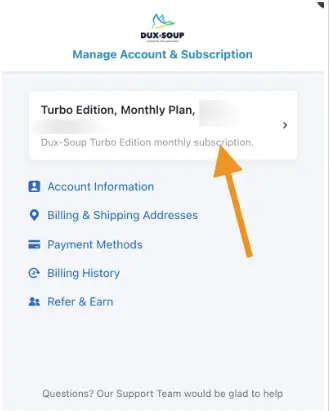
- Go to the Manage Account & Subscription section in your account settings.

3. Locate Your Active Subscription
- Find your active Dux-Soup subscription in the list.
4. Cancel the Subscription
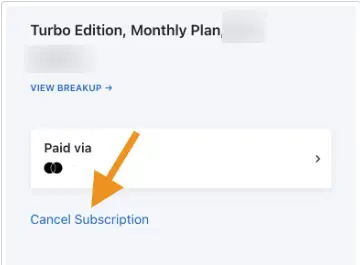
- Click on the Cancel Subscription button.
- Follow the on-screen prompts to confirm your cancellation.
4. Confirmation
- You will receive a confirmation email verifying that your subscription has been canceled.
- Note: You can continue using Dux-Soup until the end of your current billing cycle.
What Happens After You Cancel?
After canceling your Dux-Soup subscription:
- Your account will remain active until the end of the current billing period.
- You will lose access to premium features once the billing cycle ends.
- Ensure you export any important data before the cancellation date.
Why Consider Dux-Soup Alternative?
While Dux-Soup is a popular LinkedIn automation tool, it has several limitations, including:
- Complex User Interface: Many users find the interface unintuitive and difficult to navigate.
- Performance Issues: The Chrome extension can slow down your computer and LinkedIn performance.
- Risk of LinkedIn Account Ban: Automated actions may trigger LinkedIn’s spam detection algorithms, putting your account at risk.
- Limited Features in Lower Plans: Many advanced features are only available in the expensive Turbo plan.
LinkedFusion: A Better Alternative to Dux-Soup
If you are a lead generation expert looking for a reliable LinkedIn automation tool after canceling Dux-Soup, consider LinkedFusion. Here’s why LinkedFusion is a great alternative:
- Cloud-Based Automation: Unlike Dux-Soup’s Chrome extension, LinkedFusion operates entirely in the cloud, ensuring better performance and security.
- User-Friendly Interface: Simplify your LinkedIn outreach campaigns with an intuitive dashboard.
- Advanced Features: Enjoy features like personalized messaging, campaign analytics, and team collaboration.
Affordable Pricing: LinkedFusion offers competitive pricing plans to suit your needs.
FAQs About Canceling Dux-Soup Subscription
Log in to your Dux-Soup account, navigate to Manage Account & Subscription, and click on Cancel Subscription.
Yes, Dux-Soup allows you to pause your subscription. Visit the Manage Account section for more details.
Your account will remain active until the end of the billing cycle, after which premium features will be disabled.
Dux-Soup does not typically offer refunds for canceled subscriptions. Check their refund policy for more details.
No, deleting the extension does not cancel your subscription. You must cancel it manually through your account settings.
Final Thoughts
Canceling your Dux-Soup subscription is simple, but it’s important to explore alternatives that better suit your LinkedIn automation needs. LinkedFusion offers a seamless experience with advanced features and affordable pricing.
Sign Up for LinkedFusion Today and take your LinkedIn outreach to the next level!