

If you use LinkedIn for networking, job hunting, or building a personal brand, verification is no longer optional—it’s essential. With the rise in fake profiles, impersonators, and account takeovers, LinkedIn verification ensures you’re seen as trustworthy and credible. In fact, according to Microsoft, verified users get 2.5x more profile visits and 3x higher message response rates than unverified accounts.
This blog explores the LinkedIn verification process, including workplace and identity verification, its importance, what happens when you don’t verify, and how tools like Linkedfusion can help grow your network safely.
Why LinkedIn Verification Is Now a Standard Norm?
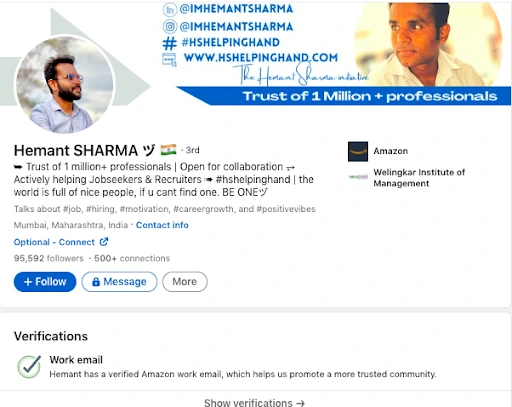
As digital identity becomes central to career credibility, identity verification on your LinkedIn profile is more than a blue badge; it’s a layer of trust. The verification badge shows you’ve provided a valid government-issued ID or confirmed your employment details through your work email or third-party verification providers.
Verification helps reduce impersonation, fake recruiter scams, and misrepresentation—common issues plaguing today’s professional networking platforms.
Whether you’re a recruiter, founder, or job seeker, adding a verification badge to your profile can significantly boost your legitimacy and engagement.
Reddit users say getting verified on LinkedIn builds trust, increases response rates, and helps you stand out in a competitive professional crowd.
Types of LinkedIn Verification: ID, Workplace, and Educational
LinkedIn currently offers three major forms of verification via trusted partners:
1.) Identity Verification via Clear or DigiLocker
To verify your identity, you must upload a government-issued ID (like a passport, Aadhaar card, or driver’s license). The name on your ID must match the name on your LinkedIn profile, and the issuing country must be supported.
For Indian users, identity verification using DigiLocker is also available. You’ll need to log in with your DigiLocker credentials to start the identity verification process. LinkedIn checks this with Microsoft Entra Verified ID, a secure identity platform.
Verification using DigiLocker: the following criteria must be met:
- The ID must match the name on your LinkedIn
- The ID must be government-issued
- Your personal phone number must be associated with the ID
2.) Workplace Verification via Microsoft Entra Verified ID
You can also verify your employment using your work email or a verification from your organization via Microsoft Entra Verified ID. Once successful, a verification will be added to your profile under your work experience.
This is especially helpful for recruiters, B2B sellers, and consultants trying to prove their association with reputable companies.
3.) Educational Institution Verification
Some LinkedIn Learning partners and universities allow you to verify via educational credentials. This includes confirming your affiliation through your university-issued email ID or school-issued badge.
What Happens If You Have Multiple LinkedIn Accounts?
Managing multiple LinkedIn accounts is discouraged and can cause serious issues. Here’s why:
- You can’t recover or access your secondary account if you lose login details
- You risk profile restriction or suspension if detected by LinkedIn
- The name on your secondary account may conflict with the verified one
- You’ll have to close your account or merge it, which leads to loss of messages, connections, or job applications
LinkedIn explicitly recommends having only one LinkedIn profile, and verification may be visible only on one primary profile.
Can You Have Two Verified LinkedIn Accounts?
No. LinkedIn’s verification is tied to one identity and cannot be duplicated across multiple profiles. The icon on your LinkedIn profile will appear only on the account where you completed the verification process.
Having two verified accounts is against LinkedIn’s privacy policy and will result in one or both accounts being flagged or removed.
Does LinkedIn Verification Really Matter?
Absolutely. Verified profiles signal credibility, reduce the chances of account impersonation, and make your interactions more trusted.
A verified government-issued ID assures others that you are who you claim to be. This builds confidence among recruiters, potential clients, and peers.
LinkedIn may display the verified badge next to your name or in the experience section, depending on the type of verification you’ve completed. More importantly:
- Verified users receive higher visibility in searches
- You’re less likely to be mistaken for a spam profile
- You can recover your account faster in case of a breach
Reddit users generally consider LinkedIn ID verification through Persona to be safe and legitimate, though some express caution about data privacy and prefer to limit the information they share.
What Are the Disadvantages of LinkedIn Verification?
While verification is generally beneficial, there are a few limitations:
- It requires uploading sensitive documents like a passport or government ID, which may raise privacy concerns
- If the name on your ID doesn’t match your profile, the process can fail
- Verification partners may not be available in all countries
- You must repeat the process if you change jobs, names, or locations
Still, LinkedIn’s privacy policy ensures your data is encrypted, and the information used for verification is not shared outside of LinkedIn or Microsoft Entra Verified ID.
What If Your LinkedIn Account Is Not Verified?
Failing to complete identity verification on your profile may lead to:
- Restricted account access if suspicious activity is detected
- Reduced visibility in search results
- Difficulty in regaining control if you can’t recover or access your account
- Potential for others to impersonate you without consequence
For professionals, skipping identity verification on your profile is like showing up to a job interview without ID; you’re less trusted and more likely to be overlooked.
Reddit users often decline LinkedIn verification over privacy concerns, questioning why sensitive ID details are needed for standard platform use.
How to Verify Your LinkedIn Profile: Step-by-Step?
Let’s break down the identity verification process:
Step 1: Open the LinkedIn Mobile App
Verification currently works best on the LinkedIn mobile app. Log in and go to “Settings & Privacy.”
Step 2: Choose the Verification Type
You can select:
- Identity Verification using DigiLocker (for Indian users)
- Verification via Microsoft Entra Verified ID
- Verification using government-issued ID
- Workplace verification via Microsoft Entra
- Educational institution verification
Step 3: Submit Your ID or Credentials
Upload a valid government-issued ID, or log into your DigiLocker or company credentials portal.
Step 4: Complete the Verification
Wait for approval. Once verified by LinkedIn’s verification partner, the verification badge will be visible on your profile.
Can You Buy LinkedIn Accounts?
Yes, but you shouldn’t.
Buying LinkedIn accounts from unauthorized sources may sound like a growth hack, but it’s actually a massive risk:
- Most are unverified and can be flagged or banned
- The name on the LinkedIn profile likely won’t match your ID
- You can’t complete identity verification, limiting account functionality
- You risk losing account access or being flagged under LinkedIn’s privacy policy
If you truly need a second profile for business or agency work, LinkedIn recommends creating a LinkedIn Page or using Sales Navigator Team accounts, not creating or buying extra personal profiles.
How LinkedFusion Helps You Grow Safely and Legitimately?
LinkedIn verification builds trust, but to truly scale your outreach and network safely, you need a reliable, compliant automation partner. That’s where Linkedfusion comes in. It is a powerful LinkedIn automation tool built for growth without compromising your identity or account safety.
Here’s how this tool helps you grow your LinkedIn presence legitimately and securely:
- Works Only with Verified LinkedIn Profiles
It prioritizes account integrity. It is designed to work with your primary, verified LinkedIn profile, ensuring that you’re not violating LinkedIn’s Terms of Service by using fake or unverified accounts. This also protects you from account bans and helps maintain a consistent professional identity online.
- Personalized Outreach with Context
It lets you send automated yet personalized sequences of messages that feel human. Because your profile is verified, these messages are more trusted and ensure that every follow-up is based on real user interaction, like connection acceptance or reply.Example: If you’ve verified your workplace or identity on LinkedIn, your outreach automatically gains more credibility when paired with this tool’s smart messaging workflows.
- Seamless CRM Integration for Compliant Data Handling
It integrates with popular CRMs like HubSpot, Salesforce, and Pipedrive, allowing you to sync verified contact data directly from LinkedIn. This ensures that only authentic, verified leads enter your pipeline, reducing bounce rates and improving sales efficiency.Moreover, it respects LinkedIn’s privacy policy and maintains GDPR compliance by not storing or using unauthorized LinkedIn data.
- No Risky Account Switching or Duplicate Profiles
Unlike shady automation tools that push users to create multiple LinkedIn accounts, it encourages responsible growth through a single, verified LinkedIn identity. This means:
- No juggling between accounts
- No risk of violating LinkedIn’s terms
- No confusion for your prospects
You maintain a clear, professional, and credible presence—especially critical if you’ve already added a verification badge to your LinkedIn profile.
- Performance Tracking with Verified Insights
It allows you to track opens, clicks, responses, and connection acceptance rates—all tied to your verified LinkedIn profile. This ensures the data you’re using to improve campaigns is accurate and tied to real human behavior.Using a verified profile also gives you deeper insights into what works best, since you’re not being penalized or shadowbanned by LinkedIn’s trust algorithms.
- AI-Assisted Commenting and Replies
It uses AI to generate intelligent comments and replies on LinkedIn posts, helping you stay active and engaged without spending hours on manual activity. Because you’re using a verified profile, these interactions are more likely to be seen as authentic and not spammy.
- Scale Responsibly, Stay Compliant
It was built for professionals who care about long-term, sustainable growth on LinkedIn. By encouraging:
- Single account use
- Verified identity-based outreach
- Compliance with LinkedIn’s policies
- Smart automation over spammy behavior
Bottom line? If you’ve gone through the effort to verify your identity or workplace on LinkedIn, the last thing you want is to jeopardize that with shady automation. LinkedFusion complements your verified profile by helping you grow faster—without ever compromising on trust, safety, or compliance.
Conclusion: Verification Is No Longer Optional
LinkedIn verification isn’t just about a badge—it’s about trust, security, and opportunity. Whether you’re a job seeker or a business developer, verifying your identity or workplace can open doors, enhance credibility, and protect your digital presence.
Don’t fall into the trap of buying accounts or creating multiples. Instead, verify your identity, use tools like Microsoft Entra Verified ID, and scale responsibly with LinkedFusion.
Your LinkedIn profile is your digital handshake. Make it verified, make it count.